Content Query Web Part vs. Custom Aggregation Web Part
During the Office Developer Conference 2008 I have attended a great presentation on high performance SharePoint 2007 solutions by Andrew Connell. And although I’ve heard a few times before that if you care for performance of your solution, and obviously you should if you’re responsible for delivering Internet-facing Publishing Sites in SharePoint 2007, it became clear to me once again: one of the best aggregation solutions out there you should use is the Content Query Web Part… or isn’t it?
The Content Query Web Part allows you to aggregate content: from a particular List, Site or the whole Site Collection. You can query the content of particular type and filter it using various criteria. As it produces XML you can separate the presentation layer from the data layer and format the output using XSL. Although highly customizable, the Content Query Web Part misses some flexibility and a few common features, each aggregation solution should have like for example paging and filtering the contents using query string parameters. Lack of XSL knowledge combined with the other reasons I have just named, are reason enough for many SharePoint 2007 developers to develop their own alternatives of the CQWP leveraging the exact functionality and flexibility as defined by the requirements. But what about the performance? Can custom aggregation solutions be compared with the Content Query Web Part? To answer this question I have set up a test case.
What’s in the deck
If you have attended Andrew’s presentation or at least had a look at the most common aggregation approaches in SharePoint 2007, you know that most of the developers use one of the following to aggregate SharePoint 2007 data:
- Enumerating collections
- obtaining a SPListItemCollection by using SPQuery
- obtaining a DataTable by using GetDataTable() and SPQuery
- obtaining data by using PortalSiteMapProvider
Having a look at the SDK you will find two more possibilities: Microsoft.SharePoint.Publishing.CrossListQueryInfo class (used by the Content Query Web Part, available with MOSS only) and the Microsoft.SharePoint.SPSiteDataQuery class available with WSS. As I have found very little information on the Internet about the performance of the different approaches (except the great paper by Steve Peschka called Working with large lists in Office SharePoint® Server 2007) I have decide to test some of them.
The Concept
In his paper Steve has presented the results based on huge lists containing over 150k items. It is really extreme, if you ask me, so I have decided to scale it down somehow to something you could achieve little more likely and yet with three zeroes: list of 2002 items. To create these items I have used the Imtech Test Content Generator - a tool I have created some time ago which allows you to create many items at once and fill them with content of your choice. So I have created 2000 news messages with a title and a paragraph of Lorem ipsum content.
To make it all a bit more difficult for SharePoint and the Web Parts I have decided to run the following query: I wanted only items of which the title started with “TestNews” (the list had 1002 other items with names that didn’t match), have them sorted descending on title and getting the overview of the first 100 of them. In other words:
<Query>
    <OrderBy>
        <FieldRef Name="Title" Ascending="False" />
    </OrderBy>
    <Where>
        <BeginsWith>
            <FieldRef Name="Title" />
            <Value Type="Text">TestNews</Value>
        </BeginsWith>
    </Where>
</Query>
The Web Part
As I wanted to test a few approaches I needed not one Web Part but four actually:
- CrossListQueryInfo
- PortalSiteMapProvider
- SPQuery with SPList
- SPSiteDataQuery
I have decided to create a Base Web Part which would provide the base functionality for the specific Web Parts like CAML Query, View Fields etc.
Another thing I definitely wanted to use in my test was the concept of XML/XSL. The Content Query Web Part uses it and I think it’s great. It allows the power users to modify the presentation layer without the need of a deployment of a new Web Part. I wanted to make my Web Parts reuse this concept and produce XML output. As the XSL processing has no impact of the performance of the particular query method so I have decided not to make it a part of the test.
Also to see the impact of Application Pool recycles on the performance I have decided to load each Web Part a few times: first after an Application Pool recycle, then full refresh (also known as CTRL+F5) and then some few more refreshes (F5).
The Results
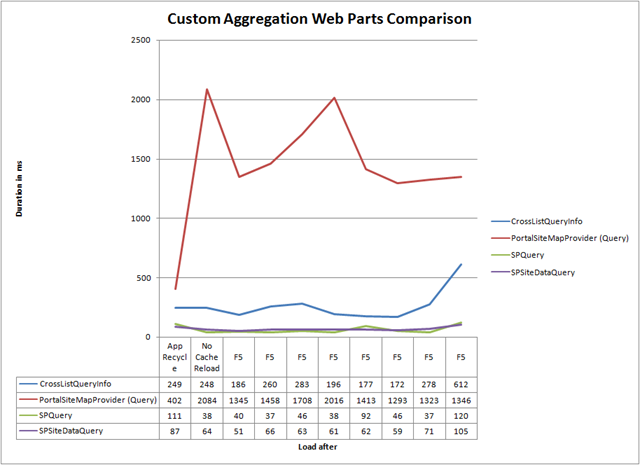
It seems like the SPSiteDataQuery and SPQuery classes perform the best of all the approaches I have tested. The way the PortalSiteMapProvider performed in the test has really disappointed me. It has already scored that poor and still what you get is the SiteMapNodeCollection which you will have to enumerate in order to get the desired XML output.
But let’s compare our winners to the Content Query Web Part:
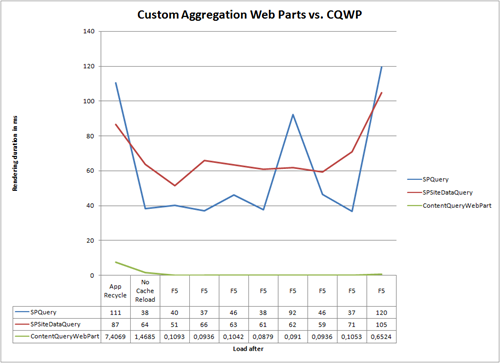
Conclusion? Custom Aggregation Solutions are crappy. But there is one more Web Part left in the deck:
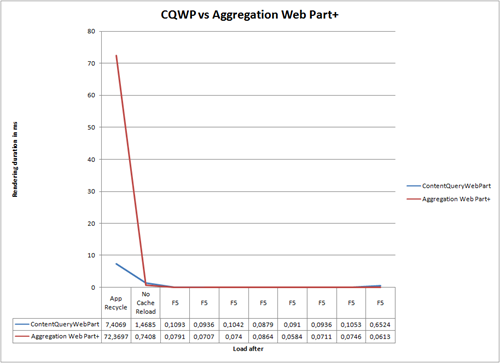
Although the initial duration of the query was pretty high I provide you the detailed view to get more information on the regular query time of both Web Parts (starting on the No Cache Reload):
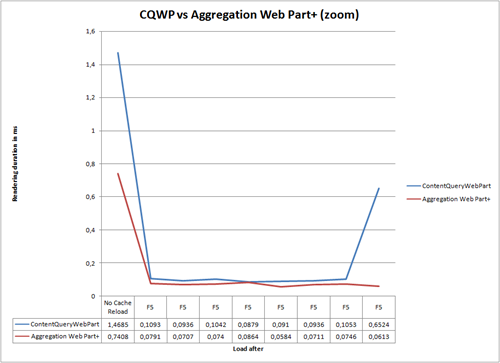
It seems that there is something better than the Content Query Web Part. So what is that Aggregation Web Part+?
Aggregation Web Part+
In case you didn’t know SharePoint provides you two base classes for developing custom Web Parts: System.Web.UI.WebControls.WebParts.WebPart and Microsoft.SharePoint.WebPartPages.WebPart. In most cases you will use the first one which is the WebPart class known from ASP.NET. It is the recommended way for developing Web Parts for SharePoint 2007. But there are cases when you will need to pull out the Microsoft.SharePoint.WebPartPages.WebPart class to do the job.
The Microsoft.SharePoint.WebPartPages.WebPart bases on the System.Web.UI.WebControls.WebParts.WebPart class itself and enhances it with some extra functionality for connected Web Parts, client-side programming and… data caching!
In case you haven’t noticed the Content Query Web Part is a WSSv3 Web Part itself. It uses some way more complex caching model than the one introduced by the SharePoint Web Part, which very likely gives the performance boost even at the first load. Still knowing that there is something which could help you creating a custom aggregation solution of great performance works for me.
The Aggregation Web Part+ I have used for the last test is exactly the same SPSiteDataQuery Web Part as used in the first test. The only difference is that in now inherits from the Microsoft.SharePoint.WebPartPages.WebPart class and it stores the output of the query in cache provided by the base class.
It seems like the test Web Part I have made works better than the Content Query Web Part but don’t forget that I didn’t implement the XSL transforming yet. Also, as far as we are now, you could be using the CQWP as well to achieve exactly the same result. As soon as you will add that enhanced functionality you want, your Web Part might get heavier and the performance might decrease.
Summary
Performance is one of the most important success factors of Internet facing web sites. SharePoint 2007 provides many mechanisms which help you achieve great performance even within highly dynamic pages. One of such solutions is the Content Query Web Part. It is a highly customizable Web Part and it provides solution for the most common challenges. Still there might be situations when you will need even more flexibility than CQWP can offer you. If that day comes, you know that you should reach for the Microsoft.SharePoint.WebPartPages.WebPart class.
Technorati Tags: SharePoint 2007, SharePoint, WCM, MOSS, MOSS 2007