Create SharePoint breadcrumbs with Mavention Simple SiteMapPath
One of the challenges while developing Internet-facing websites built on the SharePoint platform was rendering semantic breadcrumbs. Out of the box Office SharePoint Server 2007 was using for that purpose the ASP.NET SiteMapPath control. And while it looked okay visually, internally the whole control was rendered as non-semantic spans. SharePoint 2010 ships with a new control for rendering breadcrumbs called ListSiteMapPath. And while this control uses semantic markup and renders the breadcrumbs as an unordered list, the markup is too complex if all that you need is a simple list with some links. In such situation the Mavention Simple SiteMapPath can become very useful.
Breadcrumbs the way we knew them
The breadcrumbs control that we know from the Blue Band branding that shipped together with Office SharePoint Server 2007, is still available with SharePoint 2010. Not only it’s there for backwards compatibility purposes but it’s also being used by the sample Publishing Site provided with SharePoint Server 2010. If you look at the rendered markup you will see a bunch of span’s.
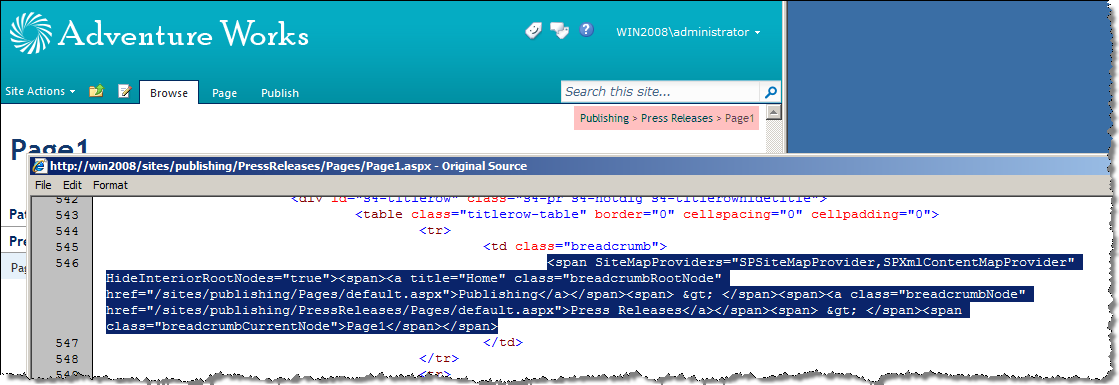
Why is this exactly an issue? For two reasons using the sample breadcrumbs code as included in the nightandday.master Master Page is bad. First of all it renders a bunch of span’s which have no semantic meaning. So if the visitor is visually challenged and uses a text browser all he sees is a just one chain of words.
Secondly the standard markup is difficult to brand. If you work with web designers who translate the branding from drawings to (X)HTML I bet not even one of them would describe a breadcrumb as span’s. That means that you would either have to modify the HTML+CSS to brand the span’s or create a custom branding control that would render the markup as provided by the web designers.
While the SiteMapPath control supports templates, which might seem the way to overcome this problem, they really aren’t. First of all using ASP.NET binding templates (<%# %>) with SharePoint Page Layouts is only allowed as long as the Page Layouts remain uncustomized. As soon as you customize it, you will get an exception stating that inline code is not allowed.
Secondly the templates only apply to nodes. So while you could turn all nodes into list items (<li>) the root element of the control will still be a span. Subclassing the SiteMapPath would allow you to override the root tag, but then you would still have to solve the first issue with the nodes being rendered as span’s.
Breadcrumbs the 2010 way
SharePoint 2010 uses two types of breadcrumbs. First of all we have the old fashioned breadcrumbs that are visible as a path. These are the breadcrumbs that we all know. Additionally a new type of breadcrumbs has been introduced: the hierarchical breadcrumbs which show where in the hierarchy of the current site you are.
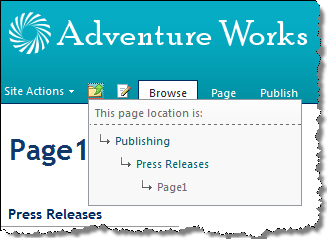
These breadcrumbs are being rendered using the new ListSiteMapPath control that ships with SharePoint Foundation 2010. The great thing about this control is that it not only renders the breadcrumbs as an unordered list, but it also does that in a hierarchical manner. Let’s have a look at the rendered markup.
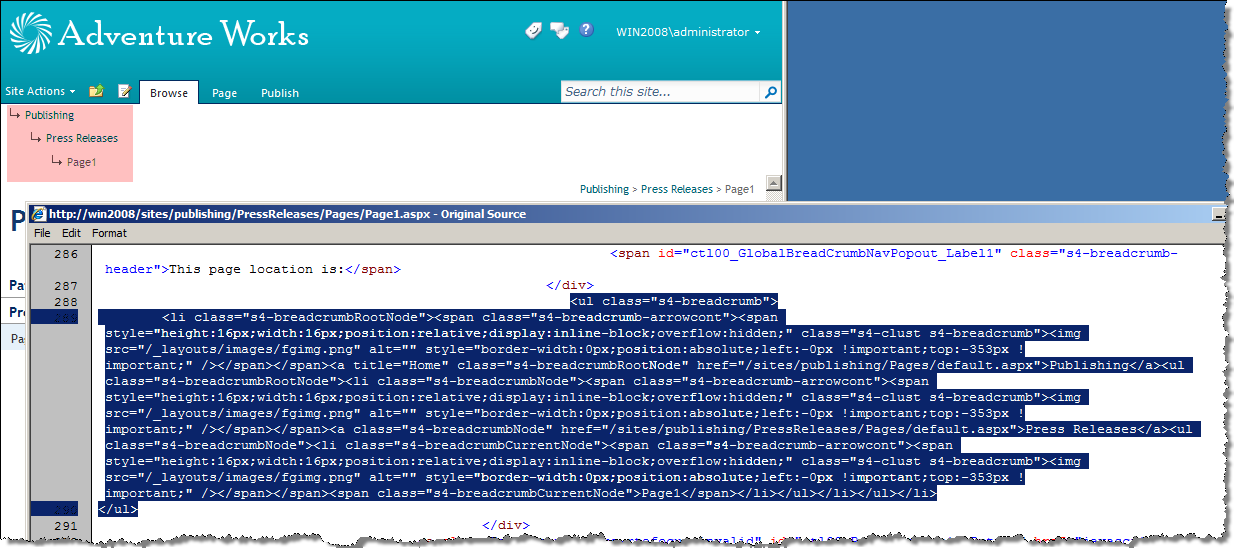
Each level of the breadcrumb is represented as a separate list nested in the parent level. Although not very popular, this is probably the best way to describe the current location on the web site in HTML.
While the ListSiteMapPath produces semantic markup it lacks one thing that makes it less useful for custom brandings than we would like. One thing that you cannot really do with it is to control the rendered HTML. They way the nodes are being rendered is hard-coded in the control. So if you for example would like to get rid of the images or simplify the markup by removing some of the CSS classes, you can’t. It just isn’t there.
This is where the Mavention Simple SiteMapPath becomes useful.
Mavention Simple SiteMapPath
Mavention Simple SiteMapPath is a custom control that derives from the ASP.NET SiteMapPath control. What it does is, it renders breadcrumb as a single level unordered list – probably the most commonly used markup for describing breadcrumbs:
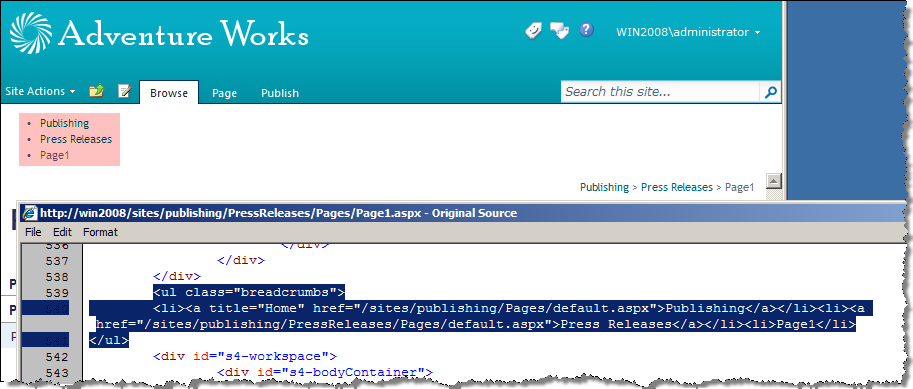
Getting it to work is simple. The control is shipped as a SharePoint 2010 Farm Solution package (WSP). After the deployment the assembly is being provisioned to the WebApplication’s bin directory together with the CAS policies required to run the code.
After the deployment you have to register the control with your Master Page or Page Layout:
<%@ Register TagPrefix="Mavention" Namespace="Mavention.SharePoint.Controls.SimpleSiteMapPath" Assembly="MaventionSimpleSiteMapPath, Version=1.0.0.0, Culture=neutral, PublicKeyToken=3fea3f4d0c0e939b" %>And then you have to add the control itself:
<Mavention:SimpleSiteMapPath
CssClass="breadcrumbs"
runat="server"
RenderCurrentNodeAsLink="false"
UseSimpleRendering="true"
PathSeparator=""
SkipLinkText=""/>
Please note the UseSimpleRendering attribute set to true. Thanks to this attribute the breadcrumbs are being rendered as an unordered list and not a bunch of span’s. Additionally you can set the PathSeparator and SkipLinkText attributes to keep only the list without any other markup.
Download: Mavention Simple SiteMapPath from CodePlex (5KB, WSP)
Technorati Tags: SharePoint 2010,WCM