Generate search engine optimized slugs for your blog posts (Live Writer Plugin)

, , ,

Search engine optimized titles, headers and URL's are very important if you want your articles to score high in the natural search results. While you definitely need to take your time while crafting the first two, let the Imtech SEO Slugs Live Writer Plugin help with the slugs.

Imtech SEO Slugs Live Writer Plugin creates an optimized slug for your blog post of any phrase chosen by you. In most cases you will use the post title to generate a slug but you can pick any other phrase as well.

Selecting phrase to create a search engine optimized slug of

To create a SEO Slug for your blog post, simply select some text in Live Writer and pick SEO Slug from the Insert panel.

Choose Insert SEO Slug from the Insert panel

The SEO Slugs Plugin will create an optimized slug for your post and will automatically copy it to clipboard so you can paste it in the Slug field:

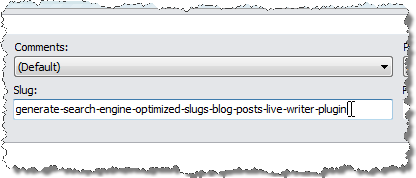
Generate a search engine optimized slug and copy it to the clipboard

Paste the generated slug into the Slug field in the post properties

The Imtech SEO Slugs Live Writer Plugin ships with a Setup Wizard so it will be automatically added to your available plugins in Windows Live Writer.

Download: Imtech SEO Slugs Live Writer Plugin v1.0.0.0 (346KB)

Possibly related posts

13 Responses to “Generate search engine optimized slugs for your blog posts (Live Writer Plugin)”

  1. ScottIsAFool Says:

    Just looked at your slug plugin. have you thought about doing a plugin like this but using the new SDK, you could then have the slug created automatically at publish time, without the user having to actually do anything

  2. Waldek Mastykarz Says:

    Haven't had a look at the new SDK yet. Thanks for the tip :)

  3. Dave J. (Scoop0901) Says:

    Is there a way to set preferences, such as maximum number of characters, i.e., 40, 50, 55, etc., that should be in the slug?

    One site I write for has a policy the slug cannot be more than 50 characters. Being able to set preferences so the plugin limits it automatically would be great.

  4. Waldek Mastykarz Says:

    @Dave J. (Scoop0901): not yet, but it's definitely a great idea. I'll keep that in mind. Thanks!

  5. Dave J. (Scoop0901) Says:

    @Waldek Mastykarz:
    Thanks, Waldek. I will be watching for that. Keep up the great work.

  6. Simon Martin Says:

    Just trying the plug-in out and it's a really cool idea. However I'm getting some odd results and wanted to give you some feedback.

    It seems that the underlying html mark-up is also being selected; for instance for the string
    "This is something I'd like to be my slug"
    what gets created / copied to the clipboard is:
    "pthis-id-slugp"

    I'm using WLW 14.0.8050.1202 en

  7. Waldek Mastykarz Says:

    @Simon Martin: Thanks for the feedback, Simon. It is possible that the underlying HTML markup is being copied. The initial idea was to create the slug out of title – as many blog engines automatically do. The title's don't contain any HTML markup. It is of course possible to use the plugin to create a slug out of any piece of text within your post: something I haven't considered initially. I hope I will be able to fix it and provide a new version soon.

  8. Amit Banerjee Says:

    I am using Wordpress and the current version allows you to define SEO slugs without requiring the plugin. Does this plugin suggest you slugs or something like that ?

  9. Waldek Mastykarz Says:

    @Amit Banerjee: I believe all major blog engines allow you to define your own slugs. The catch is what if you're using an editor like Live Writer which generates the slug for you? Of course you could always change the automatically generated slug afterwards but why do so, if you can improve the process and generate one automatically before posting the blog post?

  10. Amit Banerjee Says:

    @waldek : We can define the slugs from Live writer too. Anyway ..

  11. Waldek Mastykarz Says:

    @Amit Banerjee: I know, but then you have to take care for it yourself. I see it a bit like not wanting search & replace functionality because you can do it yourself either.
    I admit generating SEO slugs isn't a great time savior unless you do it a lot. Additionally it might give people some idea of what can be done using Windows Live Writer and perhaps and maybe even give them some ideas for improvement.

  12. Chuck Says:

    Where is the slug field located to paste the information into?

    Thanks

  13. Waldek Mastykarz Says:

    @Chuck: it's in the post information panel (available through F2 if not visible already).

Leave a Reply

Security Code:

WP Theme & Icons by N.Design Studio
Entries RSS Comments RSS
Copyright © 2007 - 2010 Waldek Mastykarz

Creative Commons License