Imtech Content Query Web Part v14 now with EXSLT

, , ,

Recently I published a new extended version of the Content Query Web Part. I extended the SharePoint 2010 version of CQWP with support for paging the results which is one of the things that our customers ask for very often. But that’s not the end of the extensibility possibilities of the CQWP. In this version I extended the Imtech Content Query Web Part even further by adding additional capabilities which make working with the CQWP even easier. Introducing: Imtech Content Query Web Part v14.2!

The first version of the Imtech Content Query Web Part that I published was focused around support for paging. Next to that I added a custom Editor Pane that makes it easier to hook up custom XSLT stylesheets.
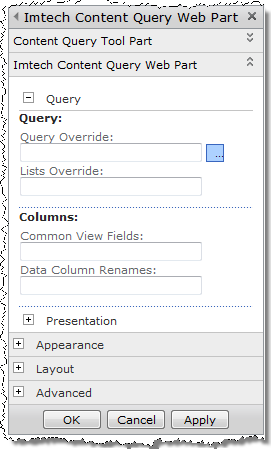
Query section of the settings of Imtech Content Query Web PartIn the second version I extended the CQWP even further. This time I focused on working with custom data. The new section in the Imtech CQWP Editor Pane allows you to specify custom query and should you need to include some custom columns the old way, you can use the Common View Fields and the Data Column Renames properties.

One more thing that I added are custom XSLT functions from the EXSLT namespace. I’ve used those really a lot in the most of MOSS 2007 projects that I worked on, so they will probably get very handy in SharePoint 2010 as well. And should you still be missing something, you can always extend the Imtech Content Query Web Part further and add your own functionality.

Check out the new version of the Imtech Content Query Web Part on CodePlex.

48 Responses to “Imtech Content Query Web Part v14 now with EXSLT”

  1. Daniele Guarneri Says:

    Hi Waldek,
    where can I find a list of the Extention Functions implemented in Microsoft XML Transformer?

  2. Waldek Mastykarz Says:

    @Daniele: which functions do you mean exactly, the one from the default namespace or the one from the msxsl namespace?

  3. Daniele Guarneri Says:

    Sorry Waldek,
    I don't understand how I can use this new CQWP with EXSLT namespace. What EXSLT namespace should I put in the XSLT template? Because there is a different namespace for each module. For example "xmlns:date="http://exslt.org/dates-and-times" for 'Date and Time' module. My first question means, which EXSLT functions work with this CQWP?

  4. JK Says:

    Hi,
    I added a Imtech CQWP on a page in SP2010. It works fine but after editing this page in SPD2010 in advanced mode. This web part shows error. It says "Web Part Error: An unexpected error has occurred"
    Has anyone experienced this problem before?
    any solution?

  5. izmir chat Says:

    ARF Controls maybe look nice – I even used it on my contact form and Imay use them for RSS – but, without proper documentation are useless. Even this site , who tries to promote them, doesn't have proper documentation.

  6. nidal Says:

    Very useful webpart, thx to share it with us

    i place the webpart and it works fine. but when i use it in a scrolled page whenever i switch between pages it get me back to the top of page and i should scroll down to see the CQWP on each time. any suggestion to maintain scrolling position ?

  7. Waldek Mastykarz Says:

    @nidal: You could create an anchor on the page such as

    and then you would append #myOverview to the page link.

  8. TexasT Says:

    I deployed the solution, activated the feature, uploaded the 2 xsl's, and added the webpart to the page. I see my data presented, but I do not see paging. Is there something missing? Could you offer some setup instructions after the webpart has been added to the page?

    Awesome looking webpart, though. I can see the usefulness.

  9. Waldek Mastykarz Says:

    @TexasT: Did you configure paging in the paging section of the Web Part settings? After adding the ECQWP you have to set the name of the paging parameter (eg. p) and the number of items that you want to see per page. The last thing is to choose an Item Style that has a reference to the paging template.

  10. Joe Thaworntaweewong Says:

    Awesome work! Thanks for sharing.

    One question I have is how do the "Query Override" and "Lists Override" work?

    Thanks again.

  11. Waldek Mastykarz Says:

    @Joe: Query Override allows you to provide your own CAML query. As for List Override you can find more information on MSDN at http://msdn.microsoft.com/en-us/library/microsoft.sharepoint.spsitedataquery.lists.aspx

  12. Joe Thaworntaweewong Says:

    Thanks Waldek for getting back with my question so quickly.

    I just have a follow-up question regarding Query Override. Can I use PageQueryString in the CAML supplied to Query Override field? The reason I ask is that I am trying to see if I can have more than 3 filters in a CQWP as I have maxed out on the one that I'm working on.

    Thanks again for your help!

  13. Waldek Mastykarz Says:

    @Joe: When using QueryOverride you can include as many filters as you want. It's totally up to you to construct the CAML query.

  14. Mike Foley Says:

    Waldek, I've been using this verion of the CQWP for a bit. It there a way to preserve other parameters on the command line when paging is used? i.e. if I use the default 'p' parameter for paging, when I hit page two, any parameters in the URL are replaced with p=2. I was using a filter URL parameter which works great for the first page, but then is overwritten when page two or more is requested using the paging UI.

  15. Waldek Mastykarz Says:

    @Mike: Unfortunately, the Web Part you're referring to, doesn't provide access to other query string parameters. The good news is, that Mavention offers a newer version of the CQWP that allows you to access all query string parameters others than the paging parameter using a XSL parameter. As it's a commercial product you would however have to purchase a license.

  16. Mike Foley Says:

    Thanks for the reply! I'll check out the Mavention version. However, it isn't immediately obvious which "Prodecten" this is on the Mavention site. Do you happen to have an english version or can you point me to the web part? I don't mind paying for web parts that meet the requirements.

  17. Mike Foley Says:

    Thanks for the reply! I\'ll check out the Mavention version. However, it isn\'t immediately obvious which \"Prodecten\" this is on the Mavention site. Do you happen to have an english version or can you point me to the web part? I don\'t mind paying for web parts that meet the requirements.

  18. Joe Thaworntaweewong Says:

    @Mike, I had the same question too. I dug a bit in ItemStyle.xsl and found that there was a special variable called "CBQPageUrlQueryStringForFilters" that would provide the page querystring. So in the XSL, you can use something like

  19. Mike Foley Says:

    Thanks so much @Joe!!! Such a straight forward and trival solution. I feel silly I didn't find that one on my own, but thanks again for the great pointer.

  20. Mike Foley Says:

    Thanks so much @Joe!!! Such a straight forward and trival solution. I feel silly I didn\'t find that one on my own, but thanks again for the great pointer.

  21. bijesh Says:

    I added a Imtech CQWP on a page in SP2010. It works fine but after editing this page in Sharepoint Designer2010 in advanced mode. This web part shows error. It says "Web Part Error: An unexpected error has occurred" . I played with it and found out this error will not occur until the page size is changed from zero. What is the issue here

  22. Waldek Mastykarz Says:

    @bijesh: It could just be the case that the Imtech CQWP doesn't handle the Design mode properly. Unfortunately I have never worked with it and SPD so I cannot provide you with any more information. Have you check the ULS log to see if you can get any more information?

  23. bijesh Says:

    I just started programming in sharepoint. Could you tell me where to find the ULS log?

  24. ashawky Says:

    Dear Waldak, amazing posy and your webpart solved a lot fo problem i had. i just have one question, i'm using ur web-part to view article pages i need the webpart to view each item with image, title (link to the item), article date, description. it all goes well except for the date thing as i'm using the CQWP fields to define mine and there is no date field and i can't get to know how to use the field overwrite property u have. can you help me with the needed steps

  25. Waldek Mastykarz Says:

    @ashawky: In SharePoint 2010 you no longer need to use the CommonViewFields or ViewFieldsOverride properties. In SharePoint 2010 the CQWP works with slots which are automatically picked up from your ItemStyle.xsl.

  26. Søren Says:

    Hi Waldek, can you please give a brief explanation and/or sample of how to actually use functions from the EXSLT namespace in a custom item style?
    Thanks a lot for releasing this, very much appreciated!

  27. Waldek Mastykarz Says:

    @Soren: Unfortunately the EXSLT namespaces are not mapped in the sample XSL files provided with the Web Part. In order to use them you would have to do the following things:
    1. In the xsl:stylesheet tag you would need to add prefixes for the EXSLT namespaces that you would like to use. You can find the list of available namespaces at http://exslt.org under modules.
    2. Add every new prefix to the exclude-result-prefixes attribute in the xsl:stylesheet tag.

    With that you can start using the EXSLT functions. You can use Reflector or any other disassembly tool to figure out which functions are exactly available.

  28. Som Nuantawee Says:

    Hi Waldek,
    Thanks very for sharing the web part, it works very well with my custom Style
    But wondering, is there a way to get this CQWP display recurring items (from different calendars).
    I just found out the the web part roll up the parent series rather than each item.
    I need to roll up all calendars in a list view, and I can’t find the way.
    Any suggestion , that would be very much appreciated, Thank you

  29. Waldek Mastykarz Says:

    Have you checked if the standard CQWP can do it and if not what the limitations are? If the CQWP doesn't return the ocurrences, I guess it would be hard to get this done.

  30. Tarjei Ormestøyl Says:

    Hi Waldek,

    Great web part, I'm try this one!

    Regarding @Som Nuantawee's question, the CQWP really struggles with recurring events OOTB. I don't think there's any easy way of showing all recurring events.

  31. Som Nuantawee Says:

    Thanks Waldek and Tarjei,

    I end up display recur icon next to the item that contain recurring items, as workaround.
    In case anyone interested.

    And need to pass the ‘Recurrence’ column in the CommonViewFields as well.

  32. Mick Wood Says:

    Hi Waldek,

    Just following up on a question Joe Thaworntaweewong raised about PageQueryString in CAML. I have tried many permutations of this but cannot get it to work. Are you able to provide an example of PageQueryString being used in CAML (for the queryoverride property of the CQWP)?

    Thanks,

    Mick.

  33. Sham Says:

    Hi, thanks for sharing a terrific web part. I have a problem with the paging; I see the paging but this seems to be limited to 2 pages only. I set a page limit of 10 and I definitely have more than 50 items in the list but only 15 are showing up (10 on page 1 and 5 on page 2)

    Thanks

  34. Waldek Mastykarz Says:

    Could it be that it's your XSLT that displays the paging incorrectly? Additionally, have you configured item limit on the CQWP by any chance?

  35. ahmed amin Says:

    where can i download the source code of the latest version, i checked here http://imtech.codeplex.com/releases/view/39782 and found nothing but the wsp and the Xsl files. please help

  36. Waldek Mastykarz Says:

    Unfortunately the source code isn't available. If you are interested in obtaining the source code for this Web Part you would have to contact my previous employer – Imtech.

  37. ahmed amin Says:

    Thanks for the reply,
    How can i contact them ? is it through the website http://imtech.com/EN or another one?

    Thanks

  38. Waldek Mastykarz Says:

    Try using the contact link on this page http://imtech.com/NL/ICT/Integrated-Solutions.

  39. Marie T. Strandmann Says:

    Hello,
    we are trying to use the imtech web part, but only get this error for all xslt we try to use:
    The web part references an untrusted XSL file. Only XSL files contained in this site's Style Library may be referenced

  40. Waldek Mastykarz Says:

    As the error message states: your XSL files must be stored within Style Library. That's the only location supported by the CQWP.

  41. esson Says:

    @Waldek: thank you for valued post
    i follow the steps and it worked fine but it show only on column from the list,if it possible to show more than one column ,could you please tell me how???

  42. Waldek Mastykarz Says:

    I don't think that CQWP supports displaying related columns.

  43. RM Says:

    Waldek,

    I'm trying to use XSLT date time functions in a MOSS 2007 List View Web Part converted to XSL.

    I added the names to xsl:stylesheet tag with a prefixe. Then added a exclude-result-prefixes attribute in the xsl:stylesheet tag.

    LIKE THIS:
    ———-

    When I try to use a date time function , I get an error " —XSLT transform failed:0×800004005 : Namespace 'http://exslt.org/dates-and-times' does not contain any functions. —-"

    I copied the exslt date.date-time.xsl to document library where the page containing the web part lives.

    Can you please let me know what I'm doing wrong.

    Thanks!!!
    RM

  44. RM Says:

    Some contents were stripped. Re-posting my question again . Please ignore the prior one.

    Waldek,

    I'm trying to use EXSLT date time functions in a MOSS 2007 DataFormWeb Part.

    I added the names to xsl:stylesheet tag with a prefixe. Then added a exclude-result-prefixes attribute in the xsl:stylesheet tag.

    LIKE THIS:
    ———-
    xsl:stylesheet version="1.0" xmlns:xsl="http://www.w3.org/1999/XSL/Transform"
    xmlns:date="http://exslt.org/dates-and-times" exclude-result-prefixes="date"

    When I try to use a date time function , I get an error " —XSLT transform failed:0×800004005 : Namespace 'http://exslt.org/dates-and-times' does not contain any functions. —-"

    I copied the exslt date.date-time.xsl to document library where the page containing the web part lives.

    Can you please let me know what I'm doing wrong.

    Thanks!!!
    RM

  45. Waldek Mastykarz Says:

    EXSLT functions are available only as a part of the Imtech CQWP. You cannot refer to them in any of the standard Web Parts available with SharePoint.

  46. Ahmed Elsagheer Says:

    i've added a custom property to the web part,how to get its value in the ContentQueryMain.xsl

  47. Waldek Mastykarz Says:

    For this you would have to override the ModifyXsltArgumentList method and add your property to the XSL variables.

  48. Ahmed Elsagheer Says:

    I'm using the extended CQWP (previous version), I override query from code.it works fine but I can't get items under folders .I used scope=recursiveall but it no good
    did I miss some property to set

Leave a Reply

WP Theme & Icons by N.Design Studio
Entries RSS Comments RSS
Copyright © 2007 - 2013 Waldek Mastykarz

Creative Commons License