Imtech Fields Explorer v1.4.1.0 (Inconvenient Site Columns update)
Development, SharePoint, Tools, WCMWhile testing the newest feature of Imtech Fields Explorer – generated Content Types and Site Columns wrapper classes I have discovered that there were some issues while using these classes for referring to Site Columns. To avoid problems while referring to Site Columns from custom code I have decided to use SPField.Id instead of SPField.InternalName. While generating wrapper classes Imtech Fields Explorer v1.4.1.0 will now use the InternalName for the property name and Id for the value:
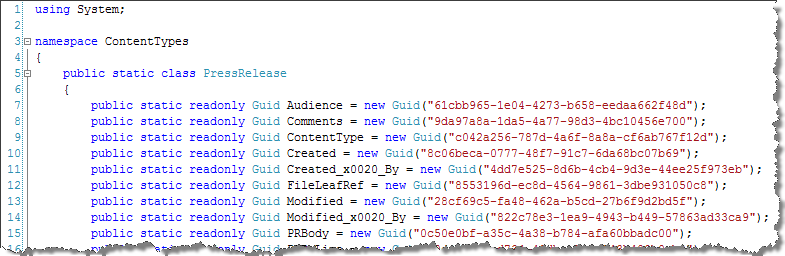
To improve the readability I have added sorting the fields by InternalName.
Download: Imtech Fields Explorer v1.4.1.0 (68KB)


February 4th, 2009 at 11:42 pm
I installed the field explorer tool into my VS2008 and used it to generate a wrapper class for a list in my site. But I don't understand how I would apply this wrapper class. And how would I apply/use the GUID on my dev/qa/production server? Can I use those values on different servers?
February 5th, 2009 at 7:09 am
@Paul Hurton: If you provision Site Columns and Content Types using Features the ID's (GUID's) will not change between the different environments so you would be safe to use the wrapper classes.
February 11th, 2009 at 6:11 pm
Hello,
I use imtech explorer to fill the values in in cqwp and I have an issue with a field: In imtech, the internal name is _x03a0__x03b5__x03c1__x03af__x03, while (showing all fields), the name should be _x005F_x03a0__x005F_x03b5__x005F_x03c1__x005F_x03af__x03
I could send you more information if you want.
BTW, Thank you very much for this freeware !
February 11th, 2009 at 7:00 pm
@Xristos K: That's really strange. Are you sure about that? All Imtech Fields Explorer does is it display the value of the SPField.InternalName property. It would be great if you could provide some more info about the field.