Inconvenient Silverlight Object Model vs. anonymous users
Development, Inconvenient SharePoint, SharePoint 2010, Silverlight, WCMSharePoint 2010 ships with Silverlight Object Model that simplifies working with SharePoint data within Silverlight components. Thanks to the new object model you no longer have to create and deploy custom services to retrieve data from SharePoint. Out of the box the Silverlight Object Model encapsulates calling standard SharePoint WCF Services which makes it extremely easy for you as a developer to create Silverlight components that communicate with SharePoint. Although working with the Silverlight Object Model is pretty easy, there is one thing that you have to keep in mind while developing for anonymous users.
Using the Silverlight Object Model you can easily retrieve data from SharePoint. With just a few asynchronous calls you can retrieve data from a SharePoint list:
public partial class MainPage : UserControl
{
public string SiteUrl { get; private set; }
private ClientContext context;
private Web web;
private ListItemCollection items;
public MainPage(string siteUrl)
{
if (String.IsNullOrEmpty(siteUrl))
{
throw new ArgumentNullException("siteUrl");
}
InitializeComponent();
Loaded += new RoutedEventHandler(MainPage_Loaded);
SiteUrl = siteUrl;
}
void MainPage_Loaded(object sender, RoutedEventArgs e)
{
LoadItems();
}
private void LoadItems()
{
context = new ClientContext(SiteUrl);
if (context != null && context.Web != null)
{
web = context.Web;
context.Load(web, w => w.Lists);
context.ExecuteQueryAsync(webSucceededCallback, failedCallback);
}
}
private void failedCallback(object sender, ClientRequestFailedEventArgs args)
{
// exception handling goes here
}
private void webSucceededCallback(object sender, ClientRequestSucceededEventArgs args)
{
Dispatcher.BeginInvoke(() =>
{
List list = web.Lists.GetByTitle("MyList");
CamlQuery query = new CamlQuery
{
ViewXml = "<View><Query><OrderBy><FieldRef Name='ID' Ascending='TRUE'/></OrderBy></Query></View>"
};
items = list.GetItems(query);
context.Load(items);
context.ExecuteQueryAsync(listSucceededCallback, failedCallback);
});
}
private void listSucceededCallback(object sender, ClientRequestSucceededEventArgs args)
{
// do something with list items here
}
}
The above code will work just fine. But as soon as you try to view your Silverlight component as an anonymous user you will get a JavaScript exception. Examining the response from the asynchronous call will show you something similar to:
HTTP/1.1 200 OK
Cache-Control: private
Content-Type: application/json
Vary: Accept-Encoding
Server: Microsoft-IIS/7.5
SPRequestGuid: 26ba18ca-cab7-453d-b58d-46ab3f4f78f2
X-SharePointHealthScore: 5
X-Content-Type-Options: nosniff
X-AspNet-Version: 2.0.50727
X-Powered-By: ASP.NET
MicrosoftSharePointTeamServices: 14.0.0.4762
Date: Tue, 04 May 2010 06:16:21 GMT
Content-Length: 352
[
{
"SchemaVersion":"14.0.0.0","LibraryVersion":"14.0.4762.1000","ErrorInfo":{
"ErrorMessage":"The method \"GetItems\" of the type \"List\" with id \"{d89f0b18-614e-4b4a-bac0-fd6142b55448}\" is blocked by the administrator on the server.","ErrorValue":null,"ErrorCode":-2147024846,"ErrorTypeName":"Microsoft.SharePoint.Client.ApiBlockedException"
}
}
]
Does it seem like Silverlight Object Model doesn’t allow anonymous users to access SharePoint data?
The solution
Although the error message clearly states that the GetItems method has been disabled by the administrator there is little information about how to enable it. It turns out that the solution is really easy and can be done either through custom code (like a Feature Receiver of a Feature scoped to Web Application) or PowerShell.
It turns out that Client Object Model methods that may be accessed by anonymous users are stored in the SPClientCallableSettings.AnonymousRestrictedTypes property. By default the restriction looks as follows:
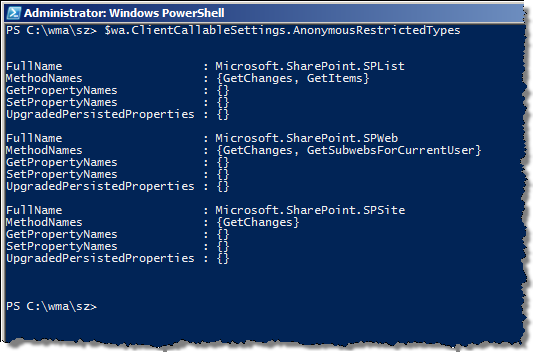
As you can see the SPList.GetItems method is among the restricted types.
In order to enable retrieving List Items by anonymous users you can call the following PowerShell code:
$wa = Get-SPWebApplication -Identity "http://sharepoint" $wa.ClientCallableSettings.AnonymousRestrictedTypes.Remove([Microsoft.SharePoint.SPList], "GetItems") $wa.Update()
The SPList.GetItems method will be removed from the restricted types and your Silverlight component will allow anonymous users to retrieve List Items from SharePoint.
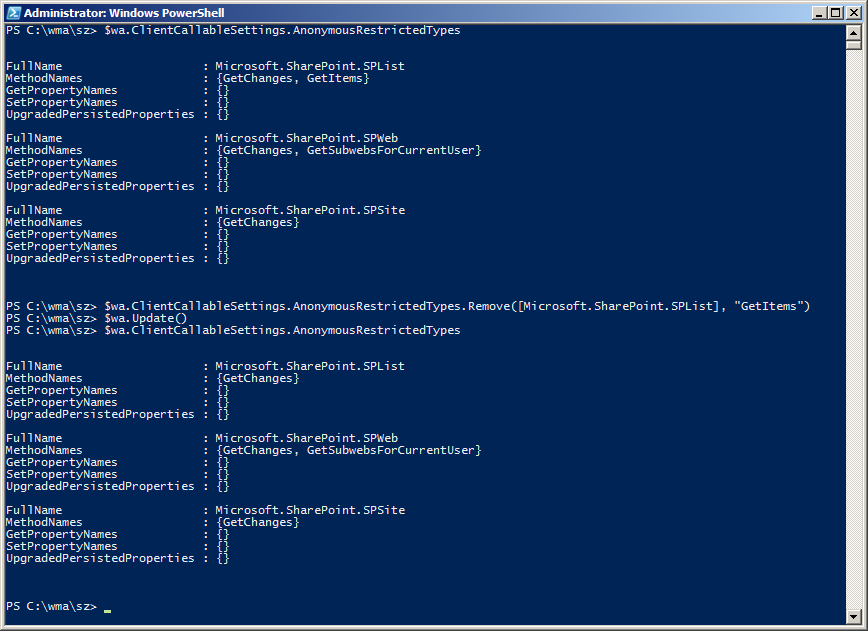
If you want to set the settings to their original state you can replace Remove with Add in the code above and the GetItems method will get restricted again.
Big thanks to Einar Otto Stangvik for the clue on how to solve this challenge.


May 4th, 2010 at 12:52 pm
[...] Dit blogartikel was vermeld op Twitter door Waldek Mastykarz. Waldek Mastykarz heeft gezegd: New post: 'Inconvenient Silverlight Object Model vs. anonymous users' http://tinyurl.com/34lovtx #SharePoint [...]
June 1st, 2010 at 7:46 am
Were you getting this error even though Anonymous users have read access to list items ?
June 1st, 2010 at 8:27 am
@Sandeep: yes
August 16th, 2010 at 5:29 pm
I did all that but still getting "GetListItems" blocked by administrator on server error. Anonymous user can browse the list fine but silverlight webpart can't.
Any ideas?
Thanks.
August 16th, 2010 at 7:00 pm
@Hardeep: are you sure that you're browsing the right Web Application? Have you tried an IISReset?
August 16th, 2010 at 7:25 pm
Actually I got it working. Somehow it didn't show the GetListItems as blocked in the PS results first time. I closed the PS session, tried again it worked.
Thanks for sharing this info.
August 16th, 2010 at 7:26 pm
Actually I got it working. Somehow it didn\'t show the GetListItems as blocked in the PS results first time. I closed the PS session, tried again it worked.
Thanks for sharing this info.
August 16th, 2010 at 7:26 pm
Actually I got it working. Somehow it didn\\\'t show the GetListItems as blocked in the PS results first time. I closed the PS session, tried again it worked.
Thanks for sharing this info.
August 16th, 2010 at 7:33 pm
@Hardeep: you're welcome. Great to hear it worked out eventually :)
November 30th, 2010 at 11:36 pm
Man, you saved my project , great !!
February 14th, 2011 at 9:21 pm
Cheers Waldek!
Totally solved my issue, yet again!
-Gavin
February 14th, 2011 at 10:29 pm
My pleasure :)
July 29th, 2011 at 2:31 pm
We are trying to access SharePoint list on Anonymous access SharePoint 2010 site via Client Object Model ECMA Script.
we are getting error message "onFailThe method "GetItems" of the type "List" with id "{d89f0b18-614e-4b4a-bac0-fd6142b55448}" is blocked by the administrator on the server.
"
is it possible access the Anonymous list using Client Object Model in ECMAScript
July 29th, 2011 at 3:14 pm
Am trying to access SharePoint list on Anonymous access SharePoint 2010 site via Client Object Model ECMA Script.
But getting error message "onFailThe method "GetItems" of the type "List" with id "{d89f0b18-614e-4b4a-bac0-fd6142b55448}" is blocked by the administrator on the server.
"
is it possible access the Anonymous list using Client Object Model in ECMAScript.
August 28th, 2011 at 10:04 pm
I am using it on a Office 365 and geting this error. Not sure whether we could something about it on Office 365 environment
August 29th, 2011 at 5:21 pm
@Vin: I'm afraid you won't be able to do much about this in O365, at least not at this moment.
September 7th, 2011 at 4:06 pm
[...] Bunu çözmek için şöyle yapmak gerekmektedir: Bu powershell ekranı, Sharepoint Products menüsü altındaki powershell, diğerinden denemeye gerek yok. Bu, SP'ye özel komutların tanımladığı olan olduğu için kolayca yapabilirsiniz. Referans: buradan [...]
November 18th, 2011 at 9:24 am
Do you have any ideas how to connect to SharePoint under claims based authentication with ADFS?
Right now I get "Not found" error =(
November 18th, 2011 at 9:47 am
@Aleksei: I suggest you post your question on the MSDN SharePoint Forums at http://social.msdn.microsoft.com/Forums/en-US/category/sharepoint2010,sharepoint
November 18th, 2011 at 12:34 pm
Thank you
I have already posted it
http://social.msdn.microsoft.com/Forums/en-US/sharepoint2010general/thread/c78dae3c-6739-4b16-94b2-d112b7d8a580
February 21st, 2012 at 6:56 pm
[...] Silverlight Object Model uses anonymous users to access SharePoint data. Unfortunately SharePoint needs to remove restrictions on some methods, called under anonymous user from Client Object Model API. Here you could find the the solution : http://blog.mastykarz.nl/inconvenient-silverlight-object-model-anonymous-users/ [...]
June 12th, 2012 at 10:01 pm
I pointed siteURL in app.xml.cs to http://sharepointsite. Sharepoint is installed locally but the list i want to read from is not local. Everything else except the list name is as you give above. The async call context.ExecuteQueryAsync(webSucceededCallback, failedCallback); always fails, with a "security error". Why is that? My browser is set to automatic logon within intranet, and my own credentials certainly have all CRUD access to the SharePoint list. I'm stumped; can you see what's wrong? I know it's probably not anything wrong with your code example….
June 13th, 2012 at 6:16 am
What do you mean exactly with 'the list I want to read is not local'? Are you trying to build new context in your Silverlight App?
June 13th, 2012 at 5:23 pm
By "not local" i mean i'm developing on one machine with SharePoint dll's that i can point to on the same machine, but the list and context i'm creating is on another machine. The list i want to test pulling data from is not on the machine i'm developing on. Does that make sense?
June 13th, 2012 at 6:23 pm
Are you authenticated when you're executing the call? If so, are you passing the credentials to the next call?
June 13th, 2012 at 6:48 pm
Waldek, thanks for your response. You mean this call: context.ExecuteQueryAsync(webSucceededCallback, failedCallback ? How do i tell if i'm 'authenticated when executing the call'? Does how the browser uses my logged on creds or not play a role here? I'm not passing any credentials from within the code or application.
June 17th, 2012 at 9:02 am
After authentication you get a cookie which is then sent with every request. With that you don't have to authenticate on every subsequent request.
July 10th, 2012 at 4:10 am
Do you know how to unblock getitems() in Office 365 environment. Or… is there any alternative to query items with anonymous users?
Thanks in advance.
July 12th, 2012 at 6:05 am
I don't think you can unblock anything. O365 is just what it is. I also don't think there is an alternative for anonymous users. From what I understand O365 has a limited support for anonymous users at the moment hence the limitations you are experiencing.