It’s quite surprising for a .NET developer to see that JavaScript doesn’t provide any mechanism to format dates. Considering how powerful JavaScript is, especially in environments where custom development is limited or not allowed, you can provide some great experience using JavaScript only. But just because something isn’t there out of the box, it doesn’t mean we can’t make it ourselves.
While working on a new project I’ve found that it would be actually great to be able to format dates using JavaScript just as you can do it in .NET. Just call a method with two parameters: date format and a locale and let JavaScript do the rest. Wouldn’t that be cool?
Formatting dates using Date.format function
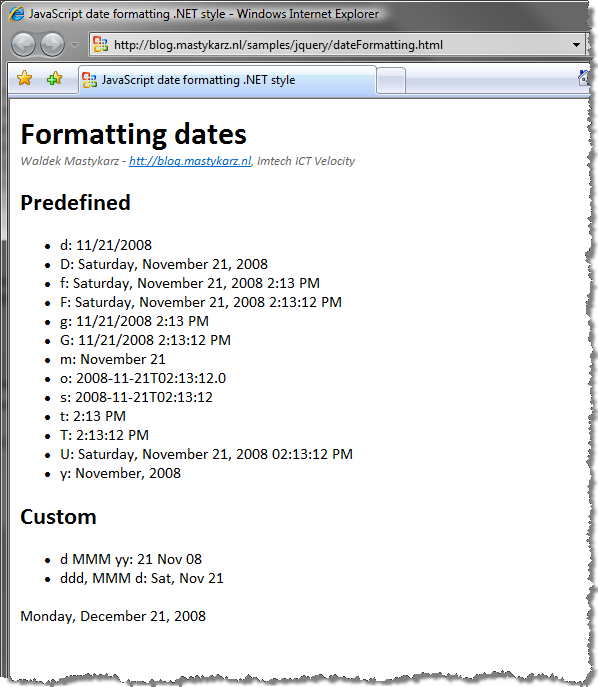
Looking at the date formatting capabilities of .NET I have created a date formatting function for JavaScript. I haven’t copied everything though. I have provided a basic formatting mechanism with a couple of predefined formatting patterns:
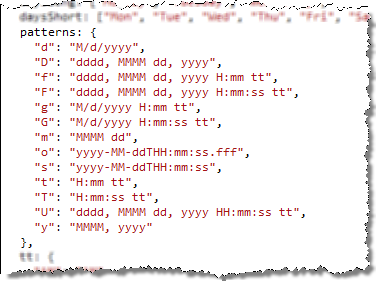
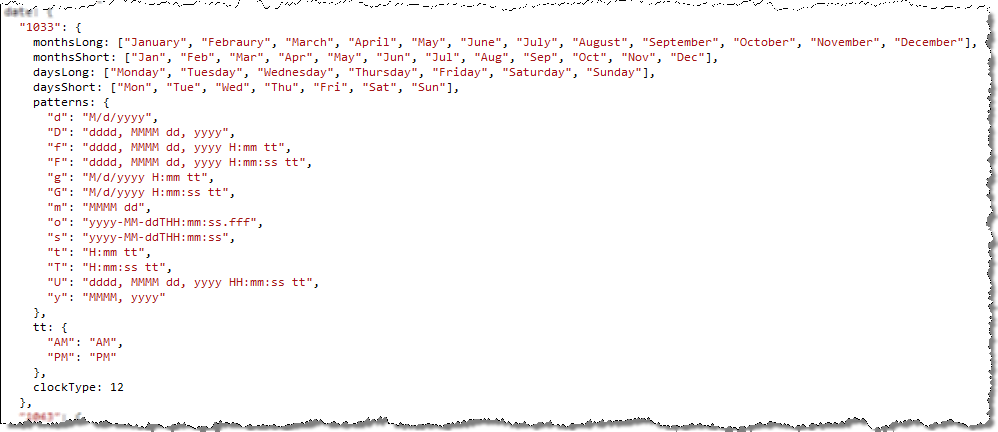
Because formatting date depends on the culture, I have added support for locale as well. Together with the library you get date formatting for US English (1033) and Netherlands Dutch (1043). If you want to extend it with your own culture simply copy an existing template, translate the names of week days and months and enter the info about the clock format: 12 or 24 hours:
To simplify the formatting process I have attached the format function to the standard JavaScript Date() object. You can now format a date using a simple call:

The cool stuff is that while typing the above statement in Visual Studio 2008 you will even get Intellisense!

While formatting dates you can use either one of the predefined patterns or provide your own. Personally I think that you should stick with the predefined ones as they automatically adjust to the provided culture. Imagine using D as the formatting pattern. While formatting according to the en-US culture you would get dddd, MMMM dd, yyyy. Only by changing the culture to nl-NL the formatted date would automatically change to dddd d MMMM yyyy. See the difference?! It’s how date formatting in .NET works and how the date format function I have provided works as well.
Check out the working example. While I have used jQuery in the presented example to help me grab the dates from the document, it is not required in order to use JavaScript date formatting.
Download: JavaScript date formatting .NET style (3KB)
Technorati Tags: JavaScript