Did you know that SharePoint 2010 ships with a brand new menu control, which allows you to render the menu as an unordered list (UL)? Using that control makes branding your menus extremely simple! Unfortunately this control is available only with SharePoint 2010. If you’re still working with Office SharePoint Server 2007 projects, you have to either brand the tables rendered by the standard SharePoint menu or create a custom control that would generate semantic markup. But wait: code no more! Proudly introducing the Mavention Simple Menu control!
SharePoint Menu 2007-style
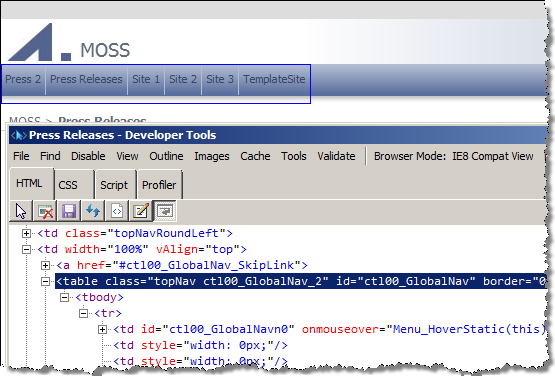
Sample Master Pages provided with Office SharePoint Server 2007 use a menu control that renders HTML tables. And while it works for the standard branding, it makes it quite complex to implement custom branding. After all I have never seen a webdesigner who would provide HTML that uses tables to display a menu. As a result, if you want to implement custom branding you either have to modify the branding to work on the tables or tweak the HTML rendered by the menu control: both of which can end up being really time consuming.
Mavention Simple Menu to the rescue
Mavention Simple Menu is a custom menu control that derives from the ASP.NET menu control, what means that you can easily use it with your existing code. One thing that the control adds is the UseSimpleRendering property.
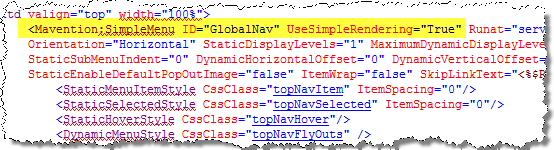
By setting it to true the simple rendering mode is being enabled: instead of dodgy tables you will see some nice UL’s generated in the HTML.
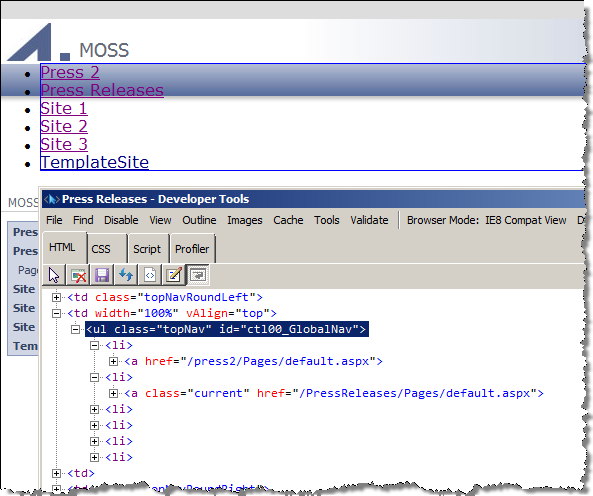
Using the Mavention Simple Menu control you can brand your site easier and focus on the really challenging parts.
Let SharePoint work for you!
Download: Mavention Simple Menu from CodePlex (4KB, WSP)


April 1st, 2010 at 7:49 pm
Nice work mate! Just did this for a customer one month ago.. could have used your thing back then! ;)
And have fun at Mavention!
July 28th, 2010 at 8:02 pm
There was an error when trying to submit this comment so I am trying again…..
Hello,
Brilliant idea! I've gone ahead and added it to my page. It looks like it is rendering correctly, however in SP Designer, in the design mode, it comes back with one of the gray boxes with the following error:
Error Creating Control – GlobalNav
Object reference not set to an instance of an object.
I am new to asp.net and to SP development, so there may be something i forgot.
I changed:
<SharePoint:AspMenu
ID="TopNavigationMenu"
…
to:
<Mavention:SimpleMenu
ID="GlobalNav"
UseSimpleRendering="True"
….
At the top of the master page, I added in:
What am I missing? Any help you can give is much appreciated!
Scott
August 1st, 2010 at 7:16 am
@Scott: no, you haven't forgotten anything. It's just that I didn't really spend time on implementing the design surface, since I don't use it. The control works correctly in the View mode, though.
September 8th, 2010 at 2:37 pm
I noticed in the code you have the A tag have the attribute target, however when i select open in new window within the dialog box of sharepoint it doesn't add a targe="_blank" to the A tag.
Any ideas how to enable that?
September 8th, 2010 at 2:38 pm
I noticed in the rendering of the <a> tag you have target as one of the attributes. However when i view the source of the rendered page there is no target attribute. I have tried to check the box for open in new window within the sharepoint dialog box with no luck getting the link to open in a new window.
Any ideas?
September 8th, 2010 at 4:32 pm
@David: unfortunately SharePoint doesn't provide any interface to allow you to configure the link target. It is however present in the control because configuring targets is supported in ASP.NET and if you have extended the Navigation Provider and are able to configure the targets, they will be automatically picked up by the menu control.
September 8th, 2010 at 6:08 pm
so using this control and a sharepoint navigation provider is not going to allow you to open a link in a new window.
September 8th, 2010 at 7:05 pm
@David: I'm afraid not.
September 8th, 2010 at 7:25 pm
Well I decided to use jQuery for all external links. If it were up to me I would never open a link in a new window, let the user decide that. Stupid project requirements.
September 8th, 2010 at 7:33 pm
@David: have you tried explaining the customer why opening links in new window is considered a bad idea? Perhaps they just don't know or think it helps keep their site on the desktop and that people will get back to it?
September 8th, 2010 at 7:53 pm
I have explained many times to them why it's not necessarily a good idea. They are pretty set in what they wanted so I've had to comply.
September 9th, 2010 at 6:28 am
@David: sometimes it's the only thing you can do. Good luck with the project.
April 14th, 2011 at 3:23 pm
Waldek,
the article does not include the tagprefix – an attempt to ceate one resulted in this
Calling the menu as such
<Mavention:SimpleMenu adapterenabled="true" id="GlobalNav" UseSimpleRendering="True" runat="server" datasourceid="SiteMapDataSource1"
orientation="Horizontal" staticdisplaylevels="2" maximumdynamicdisplaylevels="2" staticsubmenuindent="0"
dynamichorizontaloffset="0" dynamicverticaloffset="-8" staticenabledefaultpopoutimage="false" itemwrap="false"
skiplinktext="" cssclass="topNav">
Error : Unknown servertag Mavention:SimpleMenu
Where did I go wrong? Or is it just a case of an issreset? The MaventionSimpleMenu.dll is in the GAC btw.
Thanks for any update
April 14th, 2011 at 9:28 pm
@Nico: How did you edit the Page Layout: using SharePoint Designer, using a Solution or directly in the SharePoint Root? Are you sure that your changes have been applied (ie. you're not deploying updated Page Layout using a WSP to a customized instance, etc.)?
April 15th, 2011 at 8:16 am
Waldek, I see that the tagprefix was (f course) lost in the posting. So here again
Register TagPrefix="Mavention" Namespace="Mavention.SharePoint.Controls.SimpleMenu" Assembly="MaventionSimpleMenu, Version=1.0.0.0, Culture=neutral, PublicKeyToken=7a9c94a26f19594e"
I customized through SharePoint designer. After add/deploy solution. Maybe the problem is with the namespace.. Will take the reflector to investigate a bit further also..
April 15th, 2011 at 8:26 am
Okay now it works.. removed SimpleMenu from the namespace.. Pff the result though needs some work … Thank you for you quick respons..
April 15th, 2011 at 2:29 pm
There I go again… this time CSS – I see additional CssClasses defined. Like StaticMenuItemStyle CssClass="topNavItem" – I add this as the stylesheet as .topNavItem {float: left;} but no styling is applied.
I assume it has to do with the inclusion of the style references within the SimpleMenu control tags .. In your screenshot of UseSimpleRendering I can not see how this works. Any hint/link or maybe screenshot of complete control. Otherwise I only find .net stuff where they add like this :StaticMenuItemStyle-CssClass="menuitem"
April 15th, 2011 at 3:27 pm
it just drives me nuts – styles dont get applied.
THE CONTROL
<Mavention:SimpleMenu adapterenabled="true" id="GlobalNav" UseSimpleRendering="True" runat="server" datasourceid="SiteMapDataSource1"
orientation="Horizontal" staticdisplaylevels="2" maximumdynamicdisplaylevels="2" staticsubmenuindent="0"
dynamichorizontaloffset="0" dynamicverticaloffset="-8" staticenabledefaultpopoutimage="false" itemwrap="false"
skiplinktext="" cssclass="v2-tn">
THE CSS
.v2-tn-stat-item{
float: left;
}
.v2-tn-stat-item ul{
float: left;
list-style-image: none;
width: 113px;
}
.v2-tn-stat-item li{
float: left;
list-style-image: none;
width: 113px;
color: #FFFFF;
April 15th, 2011 at 3:49 pm
@Nico: Have you checked if the CSS class has been rendered to HTML? Additionally have you checked if there are any other CSS styles on the page with more specific selectors that overwrite your styles?
April 15th, 2011 at 3:59 pm
I guess it was not rendered to the HTML. Because then the 's would get a right?!? I could style the 's om the CssClass=v2-tn which is within the initial of the Control.
I mean the StaticMenuItemStyle CssClass="v2-tn-stat-item" ItemSpacing="0" declaration causes inline classes to be injected right ..
April 15th, 2011 at 4:02 pm
I meant the LI tags would get a class=v2-tn-stat-item added after rendering ..
April 16th, 2011 at 12:06 pm
@Nico: Have you checked the code? Your CSS class should be rendered properly. Additionally you might want to try to attach debugger to see where things go wrong for you exactly.
April 18th, 2011 at 10:10 am
@Waldek – loading in SPdesigner now give an error on the control "A popendtag was called without a corresponding pushendtag" – link to some info : http://ftduarte.blogspot.com/2010/08/issue-popendtag-was-called-without.html
Orginally this environment made use of a CSSadapter. Extending and un-extending the webapp made the navigation revert to a non-styled state. Luckily I found the .wsp I will go through retrect/deploy etc on this as well.
Again the result of rendering would be that UL and LI tags would be amended by my custom classes for use in CSS, right?!? (eg li class="subnav")
I'm reading up on attaching a debugger to have a look behind the scenes.
Again thanks for your time – I cant be expected to be taken by the hand on this – so I dont mind if there is no further response on this thread..
April 18th, 2011 at 12:17 pm
I had a refence set like this
StaticMenuItemStyle CssClass="v2-tn-stat-item" ItemSpacing="0"
Changes it to
StaticMenuItemStyle CssClass="v2-tn-stat-item" ItemSpacing="0px"
Now the 'pushendtag' error is replaced by 'Object reference not set to an instance of the object'- The result is still no CSS loaded..
April 18th, 2011 at 12:18 pm
I had a refence set like this
StaticMenuItemStyle CssClass=\"v2-tn-stat-item\" ItemSpacing=\"0\"
Changes it to
StaticMenuItemStyle CssClass=\"v2-tn-stat-item\" ItemSpacing=\"0px\"
Now the \'pushendtag\' error is replaced by \'Object reference not set to an instance of the object\'- The result is still no CSS loaded..
April 18th, 2011 at 3:37 pm
Okay Pushendtag error can not be trusted. I opened SPD2007 again and it starts with this error .. changing the ItemSpacing back to "0" instead of "0px" causes the error to change to Object reference not set to an instance of the object. I think I will go with nested LI's in the CSS instead of the CSS reference in the SimpleMenu control – I can not get them to load. @Waldek having some more (complete) lines of 1) the Tagprefix 2) Referencing the CSS 3. The inclusion of the Control and 4) the CSS – Maybe something for another blogpost or more for somebody to hire your services … ;-)
August 8th, 2011 at 12:45 pm
Hi,
This is exactly what I'm looking for. I mainly work in 2010 but there is an intranet where I have a requirement for a UL menu.
I've deployed the solution to my web app (it runs on a port) but it's not showing up in the site collection features or site features for the app. What am I doing wrong?
Best,
Stefan
August 8th, 2011 at 2:14 pm
@Stefan: That's correct: the Solution doesn't contain any Features. It just contains an assembly with the menu control.
August 8th, 2011 at 2:27 pm
Ah ok, so I'm not going crazy :)
Do I add a reference at the top? I'm not sure how to implement it.
August 8th, 2011 at 3:19 pm
Hah, figured it out. I should learn to read. Thanks, Waldek.