About two years ago I created a Feature for SharePoint 2007 which allowed you to generate an XML Sitemap for your site. XML Sitemaps are a standard way to notify search engines about the content on your website. And while you might consider creating an XML Sitemap for your website manually for a small site, having to manage a few hundred pages makes it quickly a pretty tedious process. Being able to do that automatically would be a great improvement and so I’ve made the XML Sitemap Feature v1.0. While it did the job it was more of a proof-of-concept than a solution that you would use in real-life. It had too many limitations to be really useful in real-world scenarios. And so the v2.0 has been born.
Going back in time
The first version of the XML Sitemap Feature worked pretty simple. It shipped as a custom HTTP Handler and was generating the XML Sitemap on every request on-the-fly. Although it theoretically did the job, it had a few drawbacks.
First of all the HTTP Handler was generating the XML Sitemap on every request, putting some heavy load on the server, especially in case of larger sites. You could solve this issue by implementing some kind of caching.
Another limitation of the first version was the fact that the generated XML Sitemap was quite static. Every page in the whole Site Collection got the same Priority and Change Frequency setting what is far from what you would in the real life. One way to work around that would be to generate an XML Sitemap automatically, and then manually locate and edit the values for specific pages. While this might work once or twice, working on a website where lots of new content is being added regularly would make the whole process quite inconvenient.
Did you know that an XML Sitemap file has some limitations? For example it cannot contain more than 50.000 entries and it cannot be larger than 10 MB. The original XML Sitemap Feature didn't contain any kind of notification system to let you know if your XML Sitemap was anywhere near those numbers, so once again you had a manual action on your list of maintaining the XML Sitemap.
A few months ago a new version of SharePoint has been released. And although it didn’t introduce any changes which might affect the working of the XML Sitemap it was definitely a great reason for a new release of the XML Sitemap Feature.
Generating and managing XML Sitemaps in SharePoint 2010 with Mavention XML Sitemap
Mavention XML Sitemap is a free SharePoint Solution that allows you to generate XML Sitemap(s) for your website. It consists of two Features: Mavention XML Sitemap Site Collection Feature which provisions resources required for generating an XML Sitemap and the Mavention Generate XML Sitemap Site Feature. Activating the Site Features adds the XML Sitemap link in the Site Settings > Site Administration section. Additionally it creates the XML Sitemap Additional Pages list (more about it later).
Mavention XML Sitemap is a Farm Solution. While I was looking at the possibilities to deliver it as a Sandboxed Solution, I realized that some of the pieces, like Long Operations (SPLongOperation) or Timer Jobs are not available in the Sandbox which may be leading to time outs while creating somewhat larger sitemaps, not to mention the consumption of the costly resources of the Sandbox.
New: Configuring Priority and Change Frequency per Content Type
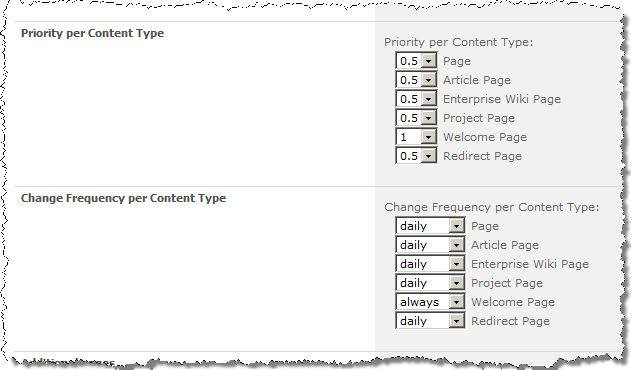
As I mentioned before, one of the shortcomings of the first version of the previous version of the Sitemap XML was the fact that all entries had the same priority and change frequency values. In this version you can set different values based on the Page Content Type. So for example, a home page, which is likely to change often, could have the Change Frequency set to always, while a press release, which never changes to never.
New: Search Engines Notifications

There is little use of an up-to-date XML Sitemap if the search engines are not notified about its changes. And while of course you could do this manually, why not simplify the process and do it automatically right after a new XML Sitemap has been generated?
In this version of Mavention XML Sitemap you can send automatic notifications to Bing and Google which are probably the most important search engines on the Internet. Right after a new XML Sitemap has been created a notification is being sent to the search engines of your choice which can then pick up and process your new XML Sitemap.
New: Including additional pages in the XML Sitemap
One of the big shortcomings of the previous version of the XML Sitemap was the fact that you couldn’t add any additional pages to the generated XML Sitemap: it was either all or nothing. So in this version this feature was one of the first things on the list.
Additional pages are stored in the list called XML Sitemap Additional Pages. This list is being created on every Site which has the Mavention Generate XML Sitemap Feature activated. You can navigate to this list from the Mavention XML Sitemap settings page using the Additional Pages > Edit Additional Pages link.

The great thing about this functionality is, that it not only allows you to add additional entries to the generated XML Sitemap but it also allows you to override the default settings for the specific pages! If you for example would like to change settings for the home page, you would include the following entry:
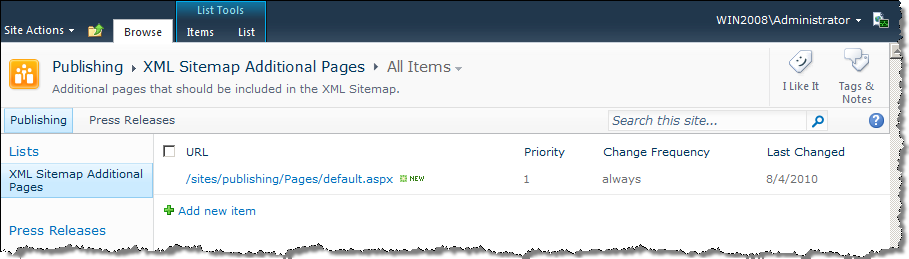
Using the server-relative URL of the page, the engine of Mavention XML Sitemap solution can match this entry with the page and apply the alternative settings to it. This functionality allows you to tailor the generated XML Sitemap to your specific needs in an easy and manageable way!
New: General information report
An XML Sitemap as specified by the sitemaps.org protocol has some limitations. It can contain no more than 50.000 entries and the generated file size cannot be more than 10 MB. If you have a website with the amount of content that would cause exceeding any of those limits you should consider splitting your XML Sitemap across multiple files. But how do you know how many entries you have and how big the file is?
Another new functionality in the Mavention XML Sitemap is the General information section which contains some information about the most recently generated (current) XML Sitemap.
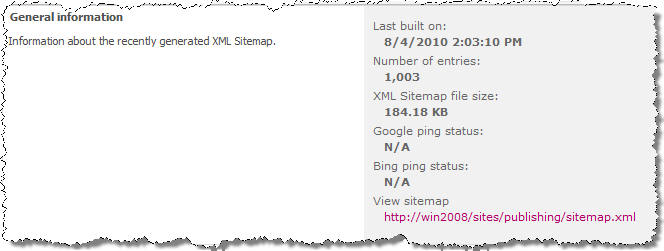
One great thing about the report is, that it not only shows you the statistics about the current XML Sitemap but also warns you if you are either about to or have already crossed any of the XML Sitemap limits!
For example if you have more than 49.000 entries the following warning will be displayed:
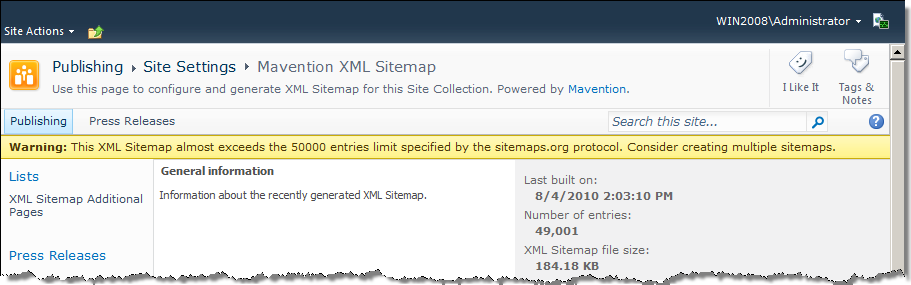
If you however cross the limit, the warning will turn into an error message:
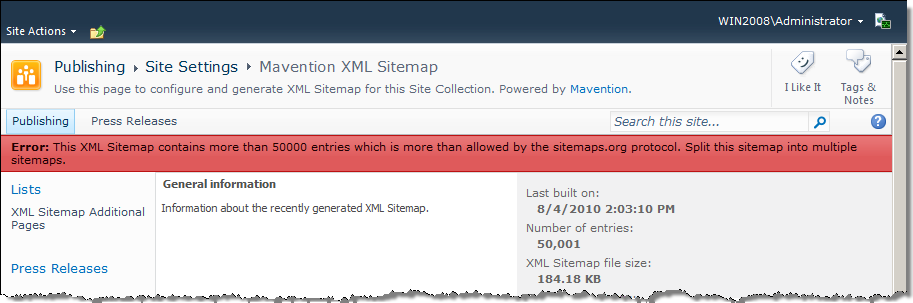
The same applies to the XML Sitemap file size limit, where the warning is set to 9.5 MB and the error is displayed above 10 MB.
Additionally to the XML Sitemap specific information, the report shows you if notifying the search engines succeeded or not.
Changed: Generating the XML Sitemap as a static file
One thing that has changed is the approach I chose for generating the XML Sitemap. In the previous version it was being generated on-the-fly as requested by the search engine. As the new version adds more functionality to the process of generating an XML Sitemap making it therefore heavier I decided to write the contents of the generated XML Sitemap to a static file within the current Site. This file is by default called sitemap.xml but this name can be changed on the Mavention XML Sitemap settings page in the Sitemap.xml filename section.
Probably the last thing left to say is, that I hope you enjoy this new version and ping me if you have any feedback.
Download: Mavention XML Sitemap (19,2KB, WSP)


August 6th, 2010 at 3:42 am
Hi Waldek, this looks great. I implemented your 2007 version and have now downloaded this and will test on a new 2010 build publishing site which I'm working on. Thanks for your efforts.
Cheers
Pete
August 6th, 2010 at 7:44 am
@Peter: Great to hear that! I'm looking forward to hear what you think of the new version.
August 18th, 2010 at 1:52 pm
Hello Waldek,
Can you provide a manual for how to add a link to additional page which will be reflected in Site map page automatically.
Regards,
Dipti
August 19th, 2010 at 6:19 am
@Dipti: sure, all you have to do is to go to the Additional Pages List and include your link including all its settings like change frequency and priority there.
September 6th, 2010 at 10:05 pm
Hi Waldek,
sounds just like I was thinking of writing myself. Do you publish the source code anywhere ? As i'd like to modify it a little and add some filtering etc. so that i could filter out specific pages or content types. Also what happens with subsites ? do these get included in the sitemap? if not i'd have modify it to handle pages in these also.
Thanks
Ed
September 7th, 2010 at 6:19 am
@Ed: Unfortunately the source code isn't available (yet). At this time you can filter the pages out using the exclusion list. All subsites are being by default included in the XML sitemap and if you need to exclude some pages you can add them to the exclusion list.
September 27th, 2010 at 10:26 am
Very new to SP2K10 so apologies, but when I try to enter the Sitemap XML settings I receive "The expression prefix 'SPUrl' was not recognized".
I am testing on Foundation, is SPUrl specific to MOSS2K10?
September 28th, 2010 at 7:54 pm
@Aaron: SPUrl is, similar to MOSS2007, a part of the Publishing namespace and therefore it's available only with SharePoint Server 2007/2010.
December 7th, 2010 at 8:16 pm
Very cool….saved me a lot of time. Quick question, Waldek, the generated sitemap does not seem to include publishing pages stored in folders in the page library.
Any insight on this…or are we missing a setting?
December 8th, 2010 at 6:31 am
@DeShon: That might just be the case. Folders in the Pages Library were a no go for a long time and as I haven't heard of many people using it, I haven't tested it explicitely. Thanks for the feedback though, I will take a look at it.
December 16th, 2010 at 8:32 am
Hi Waldek,
We've tried manually submitting the sitemap.xml file to google but it complained that the date format was incorrect. The submitted date came out as 2010-12-16T02:36:41, which seemed fine, however on closer inspection it was missing the timezone.
Any ideas?
Thanks again.
Pete.
December 16th, 2010 at 8:33 am
Hi Waldek,
We\'ve tried manually submitting the sitemap.xml file to google but it complained that the date format was incorrect. The submitted date came out as 2010-12-16T02:36:41, which seemed fine, however on closer inspection it was missing the timezone.
Any ideas?
Thanks again.
Pete.
January 28th, 2011 at 1:14 pm
Hi Waldek,
Great work – as always!
There might be a small issue with the date format, like Pete said. Can you please provide the sourcecode of this component? Then I'm able to fix this if necessary or extend some things.
I'm looking forward to hearing from you.
Kind regards,
Sven
March 25th, 2011 at 1:50 am
I am in the same position as the previous users with the timezone missing. Is there a way to either add the timezone or drop the time entirely? Google says that either solution will work.
Thank you for taking the time to create this.
May 26th, 2011 at 10:28 pm
Error when I try to configure sitemap in http://localhost/_layouts/Mavention/XmlSitemap.aspx. Error: "The expression prefix 'SPUrl' was not recognized. Please correct the prefix or register the prefix in the section of configuration.
"
May 26th, 2011 at 10:29 pm
I'm using Sharepoint Foundation in my development machine, but fires and error when I try to configure sitemap in http://localhost/_layouts/Mavention/XmlSitemap.aspx. Error: \"The expression prefix \'SPUrl\' was not recognized. Please correct the prefix or register the prefix in the <expressionBuilders> section of configuration.
\"
May 27th, 2011 at 6:49 am
@Juan: As you can see in the title of this post, the Mavention XML Sitemap solution supports only SharePoint 2010 Server. The SPUrl expression prefix is a part of the Microsoft.SharePoint.Publishing namespace which is provided with SharePoint 2010 Server. Additionally Mavention XML Sitemap supports only Publishing Pages, which are not available in SharePoint 2010 Foundation.
May 27th, 2011 at 1:23 pm
Thanks for your answer mr Mastykarz
July 20th, 2011 at 12:49 am
I was able to successfully install the WSP and get everything activated. I generated the sitemap.xml from two different site collections, but the generated XML shows the same URL in both. I suspect this is probably because we are using Host Header site collections and both reside in the same web application. Any ideas?
Also wondering if you are making the source available for your new version, because we used your 2007 version and modified it so commerce server catalog URLs would be included in the sitemap.xml. Worked very well.
Thanks for all your hard work! Nice Solution!
July 20th, 2011 at 5:51 pm
Waldek – This is a really well thought out solution. Thanks! I do have a couple of questions though. I am trying to use this solution on two seprate host header site collections that are a part of the same web application. Everything installed and activated without a problem, but the generated sitemap.xml files for each of these site collections ends up pointing to the same file. Is there a way to make this solution work for host header site collections? We were able to use your 2007 version on host header site collections.
July 25th, 2011 at 3:07 pm
@Sean: Do you mean the link in the Settings Page? Have you checked the contents of the generated files if they contain pages from different Site Collections?
July 25th, 2011 at 7:55 pm
Waldek – Thanks for the reply. Two things…Yes, the link in the settings page for each of the Host Header site collections is pointing at the same file. If you use the URL of each HH site collection and tack on "/sitemap.xml" you get a sitemap XMLs that contain different data, so that part seems to work, with one exception. Each of the "" nodes has the URL to the page, but they are all prefixed with the URL to the webapp instead of the URL to the HH site collection. The webapp URL I have is "http://sps2010dev". One host header site collection is "http://sps2010dev/" and the other is "http://gwpv2.test.com". So both XMLs have "http://sps2010dev" in their path which is fine for the HH site collection that is at "/", but not for the one at "http://gwpv2.test.com". I hope that makes sense.
July 28th, 2011 at 7:33 am
@Sean: I think I know what the problem is. At this moment the link is being generated using the URL of the public Zone for the Web Application. Because HH Site Collections have their own host headers the tool should use that header instead of the public zone URL.
August 17th, 2011 at 3:49 pm
You mentioned that there is an exclusion list where I can filter out pages I do not want included in the sitemap.xml file. Where is that list?
August 17th, 2011 at 3:53 pm
@Ray: I'm afraid I referred to a Feature that has been implemented in a latter version of Mavention XML Sitemap. Sorry for the confusion.
September 9th, 2011 at 9:59 pm
I installed solution all is well. I activate feature all is well but links does not show up in site settings under site administration. If I go to the page directly i get the following error message:
Generating XML Sitemap for thsi Site is disabled. To Generate an XML Sitemap activate the 'Mavention Generate XML Sitemap' Feature in site actions > ….
Can you help? I have activated the feature.
Thanks
September 10th, 2011 at 2:43 pm
Hi Waldek,
After deploying and activiating your solution I am unable to run it. I dont get any errors during deployment or activation but the link to the settings page does not appear and if i navigate directly to the page I get the following error message.
"Generating XML Sitemap for this Site is disabled. To generate an XML Sitemap activate the 'Mavention Generate XML Sitemap' Feature in Site Actions > Manage site features."
I would be very grateful if you could help me get this running.
Thank you
September 12th, 2011 at 6:48 am
@Jighead: There are actually two Features that must be activated in order to generate an XML Sitemap. One of them is scoped to the Site Collection and one to the Site. Be sure you have activated both of them.
September 12th, 2011 at 6:07 pm
Thanks Waldek. That was it. Works great!
October 18th, 2011 at 8:36 pm
Waldek, Are you planning on making any changes to the code so that it can handle Host Header site collections? You had mentioned in an earlier post that the tool would need to use the host header for the HH site collection instead of the public zone URL. Are you guys planning on making the source code available publicly like the 2007 version? Thanks.
October 19th, 2011 at 6:10 am
@Sean: We won't be sharing the source code of Mavention XML Sitemap. Mavention XML Sitemap is a commercial product that we are offering. The free version that you are reading about here is 1.0. In the meanwhile we have just released the 1.3 version which is available as commercial product only.
Adding support for host header Site Collection is on our ToDo list which is mostly driven by customer feedback. So far we haven't seen many customers working with host header Site Collection so it's good to hear that it's something that you are using. Let me know if you are interested in the features in the 1.3 version of Mavention XML Sitemap.
October 22nd, 2011 at 2:43 am
Waldek, My company may be interested in your commercial solution. For us host header site collections are huge deal. With your commercial version, do you include the source code? The reason I ask is that there is a need for building in hooks to commerce server and generating sitemap content based upon URLs that get generated for categories and product pages. Thanks for your time in answering our questions.
November 2nd, 2011 at 5:46 pm
Hi Waldek! I'm working on a client that is looking for a solution for a "dynamic sitemap". If you are an anonymous user, one sitemap. If you are an internal user or in a different rola, another sitemap. Does free or commercial version covers this case? Regards
November 3rd, 2011 at 2:17 pm
Do you mean an XML Sitemap or just a sitemap that can be put on your site for end users to use?
November 22nd, 2011 at 8:01 pm
Waldek: sorry about delay. To busy on
SharePoint "internals & delicatessen" this days :)
I mean a sitemap to support navigation. In this scenario we have 2 different web applications and several site collections, so general navigation is getting really hard.
November 23rd, 2011 at 5:07 pm
Mavention XML Sitemap is a solution for creating XML Sitemaps for search engines. What you need is a custom SiteMapProvider.
December 13th, 2011 at 7:18 am
Hi Waldek,
I downloaded and generated the sitemap successfully. But, I have a site with language variation in 3 languages, and I want to exclude one of the language sites from the sitemap. In one of your earlier responses, you mentioned that there is a feature to exclude specifid pages from the sitemap. Can you point out where this feature is?
December 14th, 2011 at 5:11 pm
@Sudhir: See my reply @ http://blog.mastykarz.nl/mavention-xml-sitemap-sharepoint-2010-server/#comment-89069