Programmatically creating Variation Hierarchies in SharePoint 2007
Scripting deployment of SharePoint 2007 solutions gives you numerous benefits. Not only you will be able to deploy your work in a structured and repeatable manner but it also saves you tons of time which you would otherwise spend on configuring the solution in different environments over and over again. If you’re going to automate your deployment process, you would preferably want to script it all, leaving no manual steps at all. Unfortunately it’s not always possible as both WSS and MOSS teams have protected pieces of the object model which you might need to get the job done. Luckily there are still ways to get to the protected code.
What’s the thing with Variations?
One of the areas to which the MOSS team protected the access is the object model of Variations. Because we’ve been working with SharePoint Web Content Management (WCM) quite intensively here at Imtech ICT Velocity, it was one of the first challenges we’ve faced: how to programmatically configure and provision Variations?
Most of the Internet-facing sites we have made for our customers were multilingual. MOSS 2007 provides the Variations mechanism to support multiple languages. Back in 2007 we had the deployment process fully automated. Using the Imtech SharePoint OneClickDeployment studio we were able to provision configuration of a Site Collection and its children element using XML files. Back in 2007 we were able to provision it all… except the variations. All the classes required for creating Variations are internal which means that nothing else but SharePoint’s assemblies are allowed to use them.
In October 2007 Michiel Lankamp has faced the same challenge. In order to solve it he took the .NET Reflector and explored the whole process of configuring Variations, creating Variation Labels and creating Variation Hierarchies. Eventually he came out with a working solution allowing you to programmatically provision Variations including all the settings.
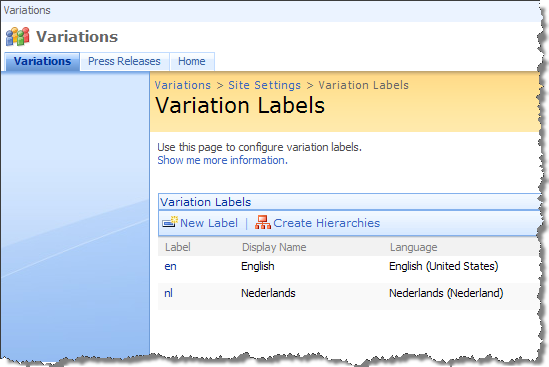 After using Michiel’s approach for a while we have discovered that there are issues with creating Variation Hierarchies. Because all the variations settings are being stored in hidden lists, Michiel was able to reverse engineer the whole process, get to the right lists, and store the settings. Variation Hierarchies however are being created by a button which triggers the Variations Long Running Operation Job. Because it’s all rather complex Michiel chose to use WebClient in order to simulate clicking the button. We have experienced two issues with such approach.
Why clicking programmatically is bad?
First of all all Long Running Operation Jobs work asynchronously. Clicking the button doesn’t create the variation hierarchies. Instead it starts a process which will eventually creates the hierarchies. We’ve found out that provisioning other settings simultaneously goes bad once in a while and throws some weird COMExceptions. Preferably you would want to wait until the variation hierarchies have been created and then continue provisioning the rest of your configuration. Unfortunately the WebClient doesn’t provide enough feedback to do that in a fashionable way.
The other thing we’ve noticed is that in some environments the WebClient doesn’t work at all. Using WebClient to retrieve a SharePoint page results in 40x errors, eg. forbidden (403) or unauthorized (401). So far we weren’t able to find out what the reason of such behavior is, but it is definitely annoying when the deployment works correctly in your development environment and then fails on the test machines.
Based on these two annoyances I have decided to give it a chance and try to find out whether it would be possible to create Variations Hierarchies using custom code. It turns out that it is possible after all.
Reflection is your friend
As I mentioned before the classes responsible for creating Variation Hierarchies are internal. You can neither get the required types nor trigger the creation process. Using reflection however you are able to call all the methods you need and use the protected code!
Using the following code snippet you can programmatically create the Variation Hierarchies:
string url = "http://somesite";
string assembly = "Microsoft.SharePoint.Publishing, Version=12.0.0.0, Culture=neutral, PublicKeyToken=71e9bce111e9429c";
string type = "Microsoft.SharePoint.Publishing.Internal.WebControls.CreateVariationHierarchiesLro";

SPSite site = null;
SPWeb web = null;

try
{
  site = new SPSite(url);
  web = site.OpenWeb();

  Assembly a = Assembly.Load(assembly);
  Type t = a.GetType(type);
  ConstructorInfo ci = t.GetConstructors(BindingFlags.NonPublic | BindingFlags.Default | BindingFlags.Instance)[0];
  Object createVariationHierarchiesLro = ci.Invoke(new object[] { url });
  MethodInfo startMethodInfo = t.GetMethod("Start", new Type[] { typeof(SPWeb) });
  startMethodInfo.Invoke(createVariationHierarchiesLro, new object[] { web });

  LongRunningOperationJob variationJob = (LongRunningOperationJob)createVariationHierarchiesLro;
  while (variationJob.ThreadIsRunning)
  {
    Thread.Sleep(1000);
  }
  // <errors></errors>
  string errors = variationJob.ErrorString;
  // <successes><success>Message</success></successes>
  string info = variationJob.SuccessString;

  // do something with the results...
}
catch (Exception e)
{
  // handle the exception...
}
finally
{
  if (web != null)
  {
    web.Dispose();
  }

  if (site != null)
  {
    site.RootWeb.Dispose();
    site.Dispose();
  }
}
First of all you need to get to the CreateVariationHierarchiesLro class which represents the Long Running Operation Job responsible for creating Variation Hierarchies. After you got it you have to create a new instance of the job. All it’s left then is to call the Start method passing the Root Web of the Site Collection as a parameter.
Because the job is being run asynchronously and we want to wait until it finishes I have added a loop using the ThreadIsRunning property. As soon as the job is finished, the value of this property changes to false what allows us to continue with provisioning the rest of the configuration.
Put it in the right context
In a normal scenario the above code would work and would create for you Variation Hierarchies. The internal code which actually creates the hierarchies uses context information to do the job. Many deployment automation tools however are custom applications which don’t provide HttpContext. Does it make the above code useless?
Luckily you can “trick” SharePoint and provide the context information required to create Variation Hierarchies. By adding a few lines of code you can create the hierarchies using custom applications:
string url = "http://somesite";
string assembly = "Microsoft.SharePoint.Publishing, Version=12.0.0.0, Culture=neutral, PublicKeyToken=71e9bce111e9429c";
string type = "Microsoft.SharePoint.Publishing.Internal.WebControls.CreateVariationHierarchiesLro";

SPSite site = null;
SPWeb web = null;

try
{
  site = new SPSite(url);
  web = site.OpenWeb();

  // provide context information
  bool contextCreated = false;
  if (HttpContext.Current == null)
  {
    HttpRequest request = new HttpRequest("", web.Url, "");
    HttpContext.Current = new HttpContext(request,
      new HttpResponse(new StringWriter()));
    HttpContext.Current.Items["HttpHandlerSPWeb"] = web;
    contextCreated = true;
  }

  Assembly a = Assembly.Load(assembly);
  Type t = a.GetType(type);
  ConstructorInfo ci = t.GetConstructors(BindingFlags.NonPublic | BindingFlags.Default | BindingFlags.Instance)[0];
  Object createVariationHierarchiesLro = ci.Invoke(new object[] { url });
  MethodInfo startMethodInfo = t.GetMethod("Start", new Type[] { typeof(SPWeb) });
  startMethodInfo.Invoke(createVariationHierarchiesLro, new object[] { web });

  LongRunningOperationJob variationJob = (LongRunningOperationJob)createVariationHierarchiesLro;
  while (variationJob.ThreadIsRunning)
  {
    Thread.Sleep(1000);
  }
  // <errors></errors>
  string errors = variationJob.ErrorString;
  // <successes><success>Message</success></successes>
  string info = variationJob.SuccessString;

  // do something with the results...

  if (contextCreated)
  {
    HttpContext.Current = null;
  }
}
catch (Exception e)
{
  // handle the exception...
}
finally
{
  if (web != null)
  {
    web.Dispose();
  }

  if (site != null)
  {
    site.RootWeb.Dispose();
    site.Dispose();
  }
}
Does Microsoft support it?
All the code responsible for creating Variations is internal. Some of the pieces have even been obfuscated. Without further thinking you might guess that we are not supposed to programmatically create Variations. Using the code I presented above we actually do it. Would Microsoft support the approach that I presented?
On one hand you might think that using the reflection is a no-go and you might get yourself into some support issues because of it. The MOSS team has made it clear that we shouldn’t programmatically create variations. On the other hand however all we’re doing is using the .NET framework and calling exactly the same code that the MOSS team wrote. We’re not accessing any of the SharePoint databases, so how bad is it actually?
SharePoint doesn’t provide any standard way of provisioning the configuration in a structured and repeatable way. If this subject is left open as a partner opportunity, we should be able to leverage the whole platform and cover the whole process, right? I hope that in the future releases such concepts will find their way to the product teams and they will provide more support to provision not only the assets but the configuration as well.
Technorati Tags: SharePoint, SharePoint 2007, MOSS 2007, WCM