Provisioning Content Query Web Part querying subsites in a structured and repeatable way
Today, while working on a brand new SharePoint Web Content Management (WCM) solution, I’ve faced quite a challenge: I needed to provision a Content Query Web Part (CQWP) which would query subsites of the current site using a custom Site Definition. Each time user would create a site using that Site Definition, he would get on the home page an aggregation of the content from all underlying sites. It’s more challenging than it sounds and you won’t know it unless you had to do it yourself once.
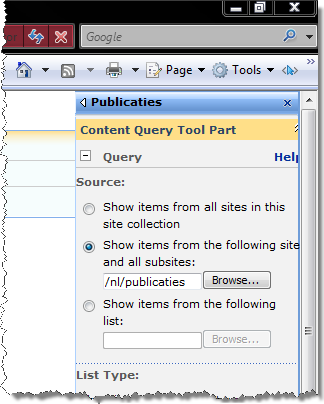 The Content Query Web Part allows you to query content using one of the three scopes. You can query the content from the whole Site Collection, from a particular web and its children and from a particular list. Looking at my requirement, I had to use the second option.
By default the CQWP queries the whole Site Collection. Using some criteria this option is sufficient in many situations. I couldn’t use that option in my situation however because: a) it would perform too bad querying a couple of thousand pages; b) it would return more content than needed.
The second option seems to be just the right thing: by passing the URL of a web, you can make the Content Query Web Part query all the content within that particular web and all the underlying sites as well. The problem is that you need to pass the server relative URL of the site you are about to create.
Tokenizing the WebUrl property
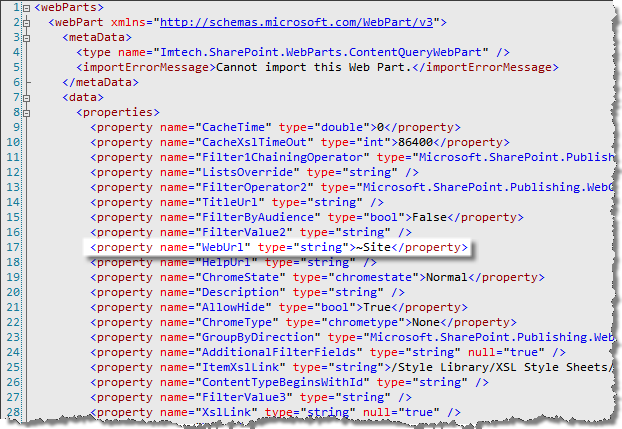
After looking for a while on how to obtain the URL of the current site inside the ONET.XML file, I have found out that you are actually allowed to use the ~Site token to point to the current site. At some point (I’m not sure whether it’s the SharePoint site provisioning engine or the Content Query Web Part self) the token is being replaced with the site relative URL of the current site – just as the CQWP requires.
Alternatives
Using the AllUsersWebPart element is not the only way to provision a Web Part. Recently there was quite some discussion about the whole idea of the Site Definition and whether it is right or wrong to use them. Personally I feel quite comfortable with using the standard SharePoint approach to deploy things. In all the time I’ve been working with SharePoint I think I’ve found my way around the whole concept and I know what I can customize and what I should leave untouched.
Provisioning the Custom Query Web Part using Features
Alternatively to the approach I chose you might want to use something else. First of all you might choose to create a Feature which would provision the web part upon activation. While this approach is definitely plausible and widely used, it doesn’t cope with my idea on structured and repeatable deployment. While you can reuse the functionality across many sites, provisioning web parts programmatically lacks overview to me. I just don’t like the idea of mixing configuration with custom code. To me XML provides more overview and context about the configuration of the particular page.
Provisioning Web Parts using Event Handlers
You could of course use the concept of Event Handler to provision the Web Part. Each time a Publishing Page is created, it would trigger your Event Handler. Using some custom logic you could determine whether to provision an instance of the particular Web Part or not. While this approach provides you with some extra control it shares the lack of overview with the approach I previously mentioned.
Summary
Provisioning Web Parts in a structured and repeatable way allows you to track the currently used configuration and improves the overall manageability of the SharePoint solution. By tokenizing the settings of the Content Query Web Part you can dynamically provision its instances which meet your requirements without mixing the configuration with custom code.
Technorati Tags: SharePoint, SharePoint 2007, MOSS 2007, WCM, Content Query Web Part