Structured and repeatable deployment of Lookup fields
Lookup Fields as we know them
SharePoint 2007 ships with various Field Types among which the Lookup fields. Lookup fields allow you basically to choose a value from a drop-down list which is based on a list (SPList) existing within the same Site. By using the Lookup fields you leverage the concept of dynamic content which allows the editors to manage the list of possible values without the need to modify the existing Site Columns definitions or any other part of the solution. While this concept, introduced by the WSS team, is definitely great and provides a basis for working with dynamically linked content, I have some doubts about deploying Lookup fields in a structured and repeatable way. To understand why, you need to understand how the Lookup fields work. While creating a new Lookup field, you have to choose a List which exists within the current site. Then you select a Field which will contain the display text of the queried values. 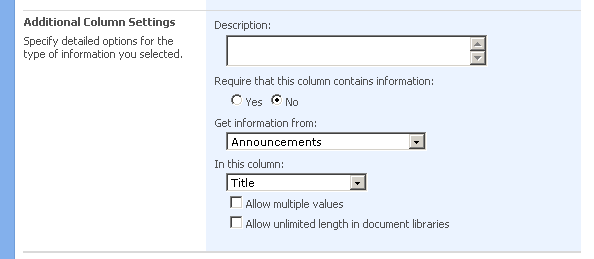 The problems begin here. SharePoint stores the choices you have made using the IDs: it stores the ID of the Site in which the Site Column has been created and the ID of the List which you have picked. Oddly it stores the InternalName of the Target Column instead of its ID. While deploying your solution in a structured and repeatable way you don’t know the ID of the target web and target list - these are being created just before deploying the Lookup field, right? To leverage the repeatability you can move deploying the Lookup fields to a Feature Receiver attached to the Feature responsible for deploying all other Site Columns and Content Types. This however, introduces another issue: having your deployment structured so you can keep the overview of the deployed configuration. Moving Lookup fields from the CAML definition where they belong, just like any other Site Column, and putting them in a Feature Receiver makes things more difficult than needed. What you could do is to provision a dummy Lookup field and edit it afterwards - if only you were allowed to. You cannot change the Target List upon creating a Lookup Field.
Alternative approach
Recently I have decided to research this subject. I chose the easy approach of extending the existing Lookup field type rather than creating a brand new one. I knew it would be possible to leverage the same functionality with the required flexibility in a custom Field Type, but since I just wanted to change the way the Target Web and List are referenced, I have decided to try to extend the standard Lookup field. First of all I have created a custom Field Editor for the Field Properties. I would use it to obtain the required references and to store them inside the field. 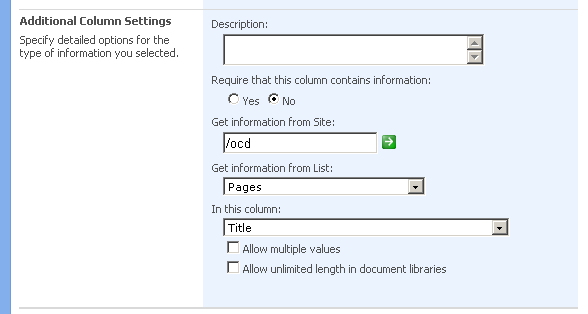 Then I have created a custom Field Type: ExFieldLookup class deriving from the SPFieldLookup class. I have extended the class with extra properties for storing the URL of the Site and the Name of the List. Furthermore I have overridden the default Properties for obtaining the Lookup information: LookupWebId and LookupList: the underlying SPFieldLookup type as well as the rendering layer use these Properties to obtain the list of lookup values. This part of the whole proof of concept was the most difficult part as the availability of various properties and values is determined by the state of the field. I had to implement a temporary storage to persist the settings as defined using the UI while creating the new Extended Lookup Field. After having created the field and exporting it using the Imtech Fields Explorer I got the CAML definition I could include in a Feature. Oddly enough, I haven’t seen anything like that before and that format is not described by the CAML Field reference at MSDN.
 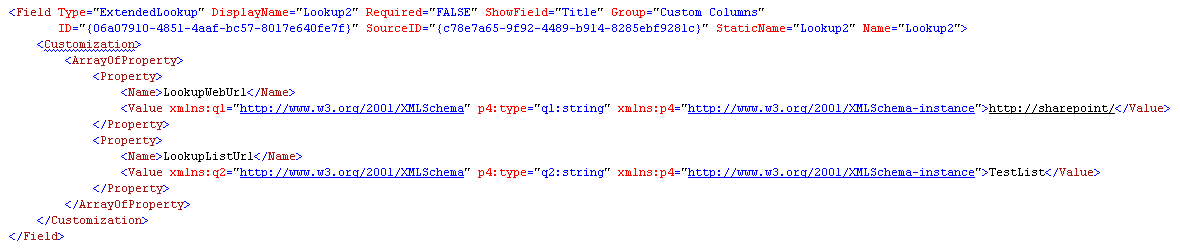 Activating the Feature has indeed provisioned the instance of the Extended Lookup Field correctly. So the proof of concept worked, right?
Where it all goes wrong
While creating a Lookup field you have the possibility to choose whether it allows multiple values or not. Unfortunately setting this property to anything results in changing the field type. First of all these types are hard coded and second of all it’s an internal method so there is not much you can do about it. As soon as you check the ‘Allow multiple values’ checkbox the control sets its own type to LookupMulti and the Extended Lookup Field becomes a regular SharePoint Lookup Field. In order to provision Lookup Fields in a fully structured and repeatable way you would have to create a custom Field Type which doesn’t inherit from the Lookup Field Type. Before you do: have a closer look at how many different things you will have to take care of: creating a custom Field Editor, persisting the custom properties, taking care of rendering in various modes and querying the data are some of the things. I’m really curious of the reason why the Lookup Fields have been implemented using ID’s instead of named references.
Technorati Tags: SharePoint, SharePoint 2007, MOSS 2007, WSS