“The name ‘InitializeControl’ does not exist in the current context” – Visual Web Part (Sandboxed) bug and how to fix it
Development, Productivity, Sandbox, SharePoint 2010, Tips & Tricks, Tools, Visual Studio 2010
A while ago Microsoft provided us with Visual Studio 2010 SharePoint Power Tools – a set of productivity extensions for the Visual Studio 2010 SharePoint Developer Tools. One of the improvements shipped with the Power Tools is the Visual Web Part (Sandboxed) that – as the name says it – allows you to both benefit of the great design capabilities of Visual Web Part while still being able to deploy it to Sandbox. Unfortunately if your Sandboxed Visual Web Part will get too large things won’t be working as expected anymore.
Visual Web Part 101
One of the great things about Visual Web Parts is the simplicity of designing the UI. While in a regular Web Part you would have to code every single line of the UI, the Visual Web Part allows you to leverage the power of User Controls’ (ASCX) design surface to design the UI imperatively, what makes it very easy not only to design the UI but also to maintain in.
During the deployment process the User Control is being deployed to the {SharePoint Root}\TEMPLATE\CONTROLTEMPLATES folder. On runtime the Web Part loads the User Control and instantiates it and so the imperative UI becomes a part of the Web Part.
Visual Web Part (Sandboxed)
When working with Sandbox things look a little different. Sandboxed Solutions have no access to the file system and therefore cannot deploy any files, such as User Controls, to the SharePoint Root folder. Luckily, there are better alternatives for us than coding the UI in our custom Web Parts.
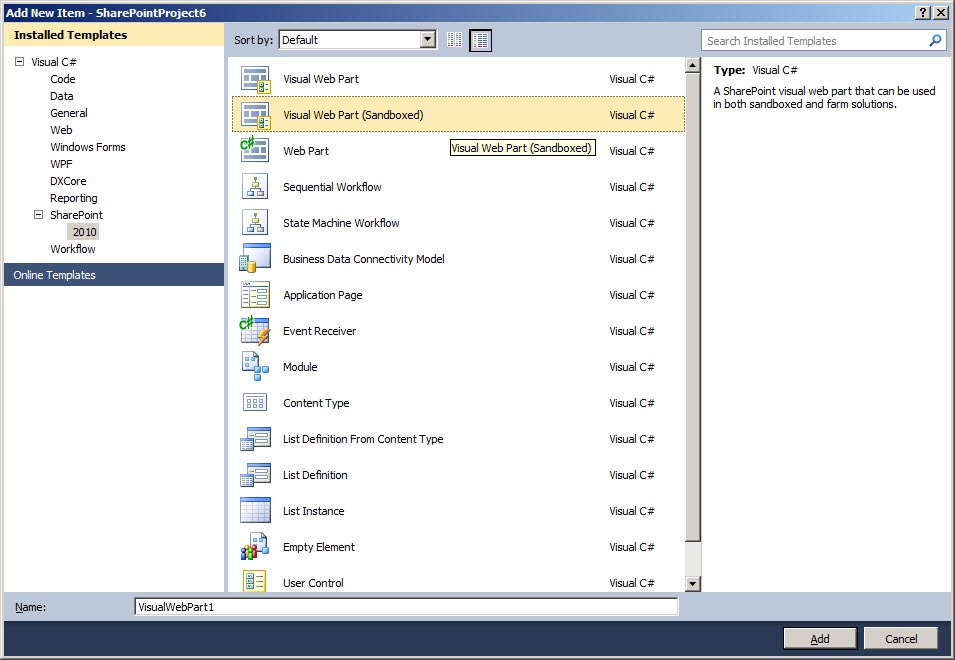
Last June Microsoft provided us with a great alternative to coding the UI – the Visual Web Part (Sandboxed). Provided as a part of the Visual Studio 2010 SharePoint Power Tools, the Sandboxed Visual Web Part is a great productivity extension every SharePoint developer should be familiar with. Just like its older brother, the Sandboxed Visual Web Part uses User Controls to imperatively design the UI. The biggest difference between those two Web Parts is that during the build process, the User Control of the Sandboxed Visual Web Part is being parsed and included in the assembly as a class. And so no trace of ASCX is to be found in the generated SharePoint Solution Package (WSP) and the Web Part can be deployed to Sandbox.
Sandboxed Visual Web Part offers you a great way to create custom Web Parts and become productive. Additional benefit that you get from using the Sandboxed Visual Web Part is the security: because you don’t need to load and instantiate the User Control on runtime the Sandboxed Visual Web Part requires less privileges. So even if your Solution won’t be deployed to Sandbox you should definitely consider using the Sandboxed Visual Web Part.
There is however one ‘however’…
The name ‘InitializeControl’ does not exist in the current context
Recently, while working with the Visual Web Part (Sandboxed), my fellow developer stumbled upon a weird issue. After implementing some UI in the Sandboxed Visual Web Part’s User Control, he got the following error while trying to build the project:
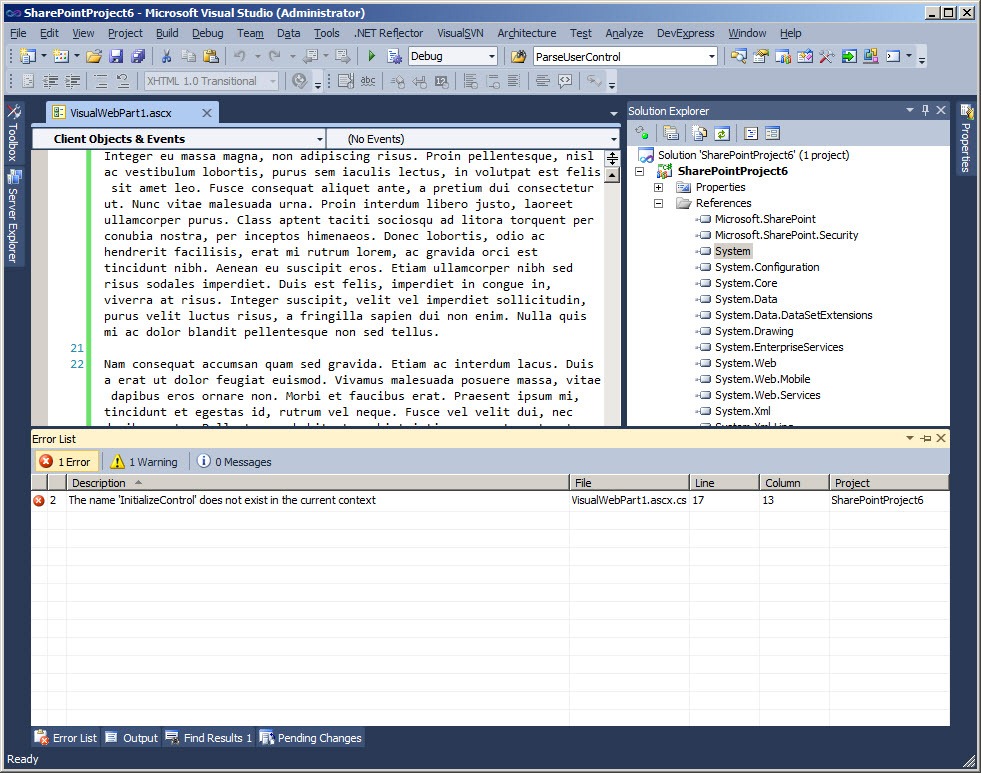
Surprisingly: the User Control’s designer file (.ascx.g.cs) was missing! What’s also surprising was that a newly added – empty – Visual Web Part (Sandboxed) didn’t give such error. So what was exactly going on?
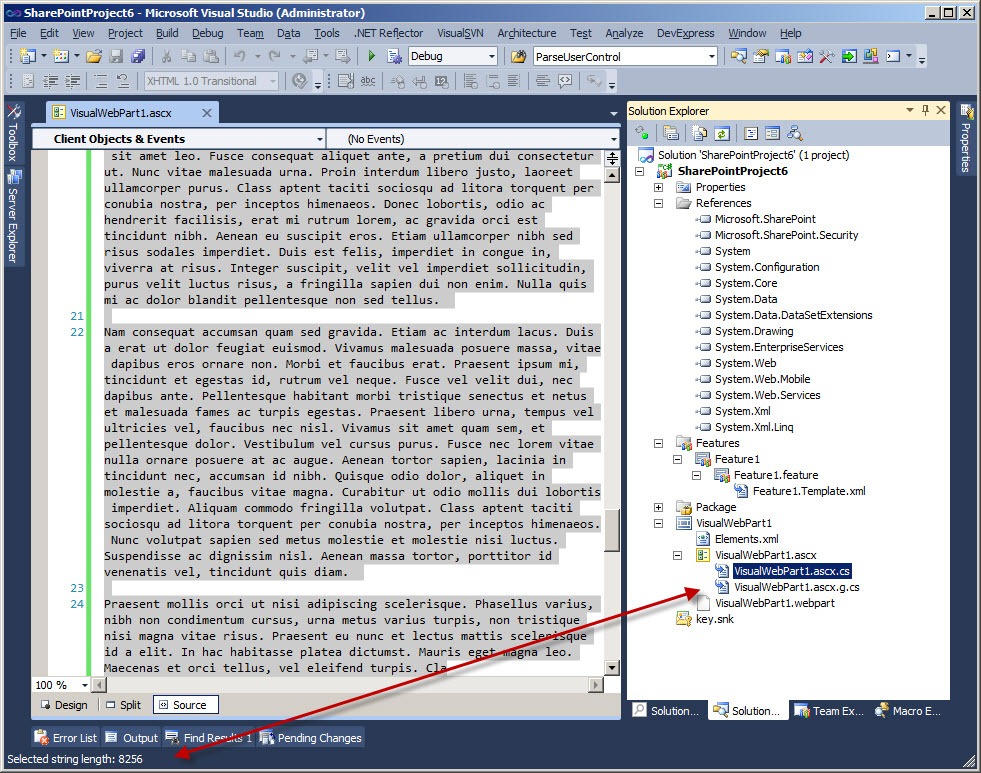
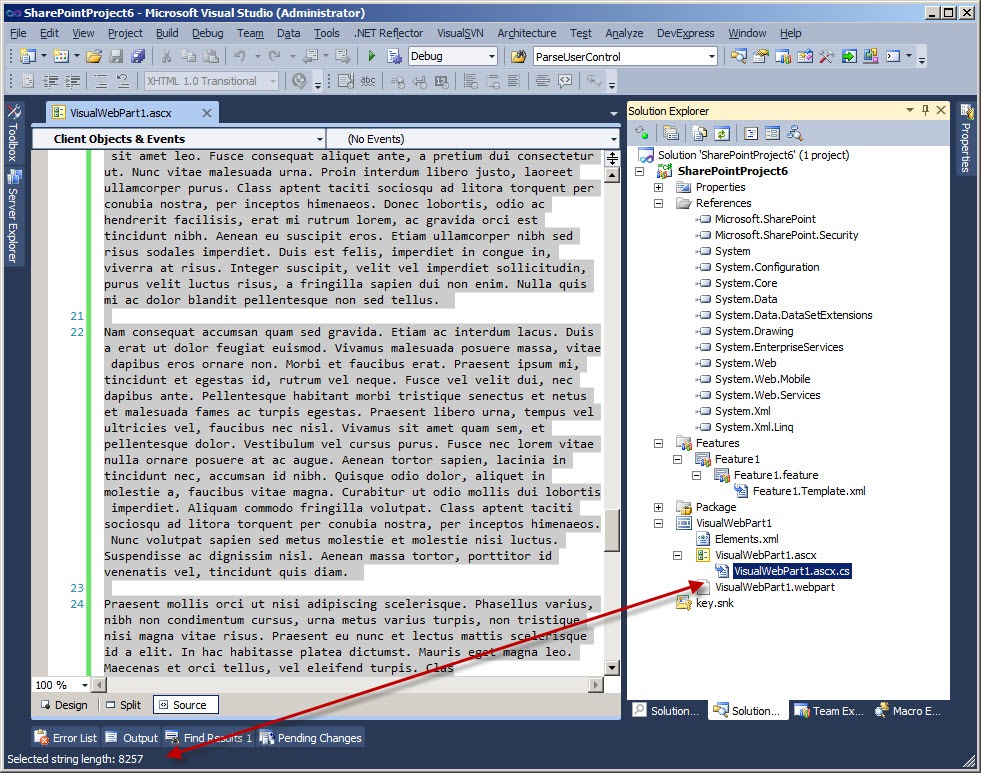
After some research we found out that the error has to do with the length of the contents of the User Control. Once you exceed the limit of 8256 characters the User Controls won’t be parsed anymore. Compare the two images. With the contents length of 8256 characters the ascx.g.cs file is still present in the solution.
Once you add another character to the file and save it, the ascx.g.cs file will disappear and the familiar error will appear if you try to build the project.
So does this mean we have to slice UI into multiple controls in order to use the Sandboxed Visual Web Part?
Fix, the
The great news is, that we don’t have to do anything with our code! Last December Microsoft published Visual Studio 2010 Service Pack 1 Beta which fixes this issue. After you install this Service Pack, the limit issue is solved and you can proceed with designing rich and complex UIs for Sandboxed Visual Web Parts.
Big thanks to the Visual Studio team for fixing this bug!


January 26th, 2011 at 9:24 pm
Hi Waldek,
I've had this problem in the past and I was not aware it was fixed, so thank you another time.
I just want to add that in my case the error message was completely different and was:
Warning 19 The custom tool 'SharePointWebPartCodeGenerator' failed. There was an error deserializing the object of type Microsoft.VisualStudio.SharePoint.Commands.CommandParameter. The maximum string content length quota (8192) has been exceeded while reading XML data. This quota may be increased by changing the MaxStringContentLength property on the XmlDictionaryReaderQuotas object used when creating the XML reader. Line 197, position 21.
January 26th, 2011 at 10:16 pm
@Massimo: Hi Massimo, I've seen you thread on MSDN SharePoint Forums indeed and I was really surprised seeing that I had more chars to spend than you ;) The most important thing is that it's fixed and we can benefit of the Sandboxed Visual Web Part.
April 2nd, 2011 at 2:12 am
I have installed Visual Studio SP1 (Version 10.0.40219.1 SP1Rel) and the Visual Studio 2010 SharePoint Power Tools.
When I create a Visual Web Part (Sandboxed) from scratch in an Empty SharePoint Solution, the ascx.g.cs file is NOT created. So I end up with a newly created project that does not compile (InitializeControl does not exist in the current context).
Am I missing an update or some other fix?
Thanks
April 2nd, 2011 at 7:28 am
@Dave: that sounds like a bug somewhere on the way. I assume you provided a correct URL while creating the project, right?
May 10th, 2011 at 4:32 pm
I also received this error, but when I was introducing AJAX functionality. I have installed the Visual Studio 2010 SP Power Tools and SP1 but still get the error unfortunately (no lengthy ASCX).
May 18th, 2011 at 9:34 pm
@Ben: You could try to see if enabling debugging for the Visual Studio 2010 SharePoint Developer Tools would provide you with some additional information about your issue. You can find more information about how to do this here: http://msdn.microsoft.com/en-us/library/ee471440.aspx
June 21st, 2011 at 10:33 am
Hi Waldek, I still see the issue even with the newly added visual web part(sandboxed). designer file is missing. I also installed the service pack 1. Is there a way to track this issue.
June 22nd, 2011 at 6:13 am
@SK: Are you sure there's nothing else wrong that would keep your project from building and therefore from generating the designer file?
June 22nd, 2011 at 6:37 am
@Waldek: The issue is resolved, it is because I used a site URL which is not existing. I updated the site URL with a new one then when I add visual web part then I am seeing designer file.
July 15th, 2011 at 4:11 pm
Hi guys,
I still have the same problem with the sp1 installed…
July 26th, 2011 at 11:51 am
I Have also same problem with Sp1 Installed.
July 26th, 2011 at 11:55 am
what is this exactly issue. when i am going to add multiple control in visual webapart the designer file was hide. how to solved this problem.i have also installed visual studio 2010 sp1 please help
December 15th, 2011 at 12:37 pm
You saved enormous amount of my time. Thank you.
January 1st, 2012 at 5:34 pm
I've been fighting with this whole day :/ In my case I've project which was working on another computer and not on the another. After rebuilding and packaging project .g.cs files were removed by VS.
As it turned out it was because I've used fake site URL in project properties (just like SK said).
March 14th, 2012 at 5:30 pm
Hello,
still got this problem. And I think with a valid URL. Any other ideas?
March 17th, 2012 at 11:15 am
@Roman: Are you using references to any external assemblies that are not deployed to GAC?
March 17th, 2012 at 6:53 pm
@Roman
If this was a problem with valid URL to the SP site then, as far as I remember, after rebuilding the project *.g.cs files will disappear and they will be NOT restored after setting valid URL (and rebuilding). You have to add new webpart or fight with .csproj file ;)
June 26th, 2012 at 5:43 pm
Does anyone get resolved this issue. Previously I use to have visual studio 2010, it allows me atleast 8256 characters and after that designer file disappears and it won't compile. Now after seeing this, I installed Visual studio 2010 sp1, it got more worse than previous. Now its not at all creating designer file(.ascx.g.cs). Any help would be appreciate.
July 2nd, 2012 at 8:40 am
Have you tried to check if it's the particular ASCX that isn't working or does Visual Studio 2010 not build ASCX anymore at all?
July 17th, 2012 at 2:58 pm
hi waldek,
i am trying to convert a visual webpart into sandboxed visual webpart,i have sp power tools installed,i am using same html code from visual webpart,but still for textboxes,button,dropdownlist in source code its showing error"doesnot exist in current context".
July 18th, 2012 at 11:06 am
Thanks a lot and fighting with this issue since long hours.
July 18th, 2012 at 12:05 pm
Hi Remo,
This problem might be again with number of characters issue. You can try installing visualstudio 2010 SP1 or test it by removing some characters from your code files as Waldesk suggested.
July 19th, 2012 at 11:36 am
Is there a method to use datetime controls in sandboxed visual webpart(sp power tools is installed).?
July 20th, 2012 at 6:58 am
Declaratively you should be all good. Programmatically: if the namespace/control is available in Sandbox you should be able to do that, if not, then it's not possible.
July 20th, 2012 at 8:50 am
thanks waldek.
September 29th, 2012 at 2:34 pm
I also encountered this maximum length issue with my sandboxed visual web parts. I installed Visual Studio 2010 SP1, but I still had the same problem: the .ASCX.G.CS file was not being created so the build failed. SP1 did not immediately fix it.
But, I found that if I took some characters out, so that it was below the limit, and I rebuilt it, the build would work and the relevant .ASCX.G.CS was recreated. Now with this file recreated, the SP1 fix takes and you can go past the initial limit.
February 19th, 2013 at 11:17 am
Hi all,
Yes, I also had it. Then I installed SP1 while prayin it might do some magic. Then I restarted the server and told everyone it was for maintenance.
Finally I reopened the sandboxed solution and deployed it, hopping not to get the same error. And I got the same error. The frustration was overwhelming. I lost faith in everything I knew and contemplated the ideea of a new career in organised crime.
… but then I read Bretts comment and while clearing 1 markup line ata time I recompiled the project until the error dissapeared. And then I could finally write and deploy without Visual Studio going retarded on me.
So … thanks Waldek, Brett, and all other folks who fought with this dark issue.
March 27th, 2013 at 2:31 pm
Hi,
I still have a problem with disappearing code in my webpart's ascx.g.cs-file if I use a custom usercontrol like this in SharePoint 2013:
The path is definitively correct, if I create a Visual Webpart in SP2010-Style manually without the "Add new item"-Template from VS2012, the code works.
How can I use my old user controls referencing ascx with code-behind in this new Visual Webpart 2012-Style in my farm solution?
Greetings and thanks a lot
Ricky
April 26th, 2013 at 2:57 pm
Hi,
I've got the problem too in Visual Studio 2012.
Insert a usercontrol in a Visual WebPart
May 21st, 2013 at 8:43 am
facing same issue, any suggestion? Thanks in advance.