Imtech Fields Explorer Visual Studio 2008 plugin
Development, Productivity, SharePoint, Tools, Visual Studio, WCMFor the last couple of weeks we’ve been thinking here at Imtech ICT Velocity about how we could improve our SharePoint development process. During the last year we have gathered a lot of different tools which help us to automate the routine. And while they all are definitely very useful, they make the development environment quite complex. Maybe even too complex. One of the improvements we thought about was integrating all these different tools we have made into Visual Studio. Imtech Fields Explorer is the first one to go.
Imtech Fields Explorer: how it all started?
Imtech Fields Explorer is one of the tools we really use a lot. It all started with the inability of exploring properties of Site Columns and Content Types and the Internal Names in particular. We needed a simple tool which would allow us to quickly find the field names we need to enter in CAML queries and controls.
When the first version came out we thought that it would be extremely useful and time saving to be able to export the Site Columns and Content Types to XML. Initially I wrote some code to do that but eventually I asked Andrew Connell whether I could include his WCM STSADM commands’ code in Imtech Fields Explorer.
Just recently an idea of yet another improvement was born: why not generate C# wrapper classes to simplify working with Site Columns and Content Types in code? Imtech Fields Explorer was the tool to make it done. Another benefit we got was intellisense: just as you have it for SharePoint built in fields.
Right after that I came up with another idea: how about we let Imtech Fields Explorer generate whole Page Layouts for us? Of course we cannot make it render the complete HTML markup, but even something simple as having all the fields as controls on the page was great. This functionality allowed to cut quite a few hours on the development process.
Imtech Fields Explorer Visual Studio 2008
In the last few months we have discussed it a couple of times how we could create a better experience while developing SharePoint solutions. One of the things we came up with was integrating all our tools inside Visual Studio making it the SharePoint developer’s desktop. Imtech Fields Explorer is only the top of the iceberg but the concept has given us a great start for 2009.
For the last couple of weeks one of my colleagues at Imtech ICT Velocity – Jeffrey Schmitz has worked on moving Imtech Fields Explorer into Visual Studio 2008 IDE. Just last week he finally pulled it off! From now on Imtech Fields Explorer is available as a Visual Studio 2008 plugin.
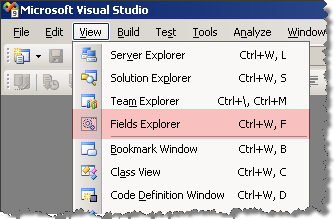
You can find Imtech Fields Explorer under the View menu: at the same place as other tool panes.
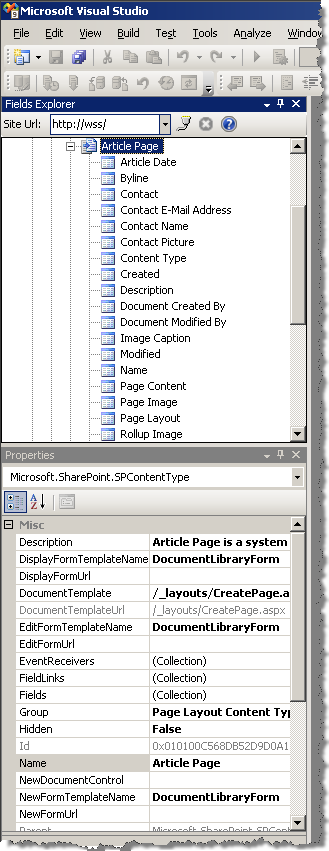
Because we’re using Visual Studio as the environment, we have decided to remove Fields Explorer’s property grid and display properties in the Visual Studio Properties pane:
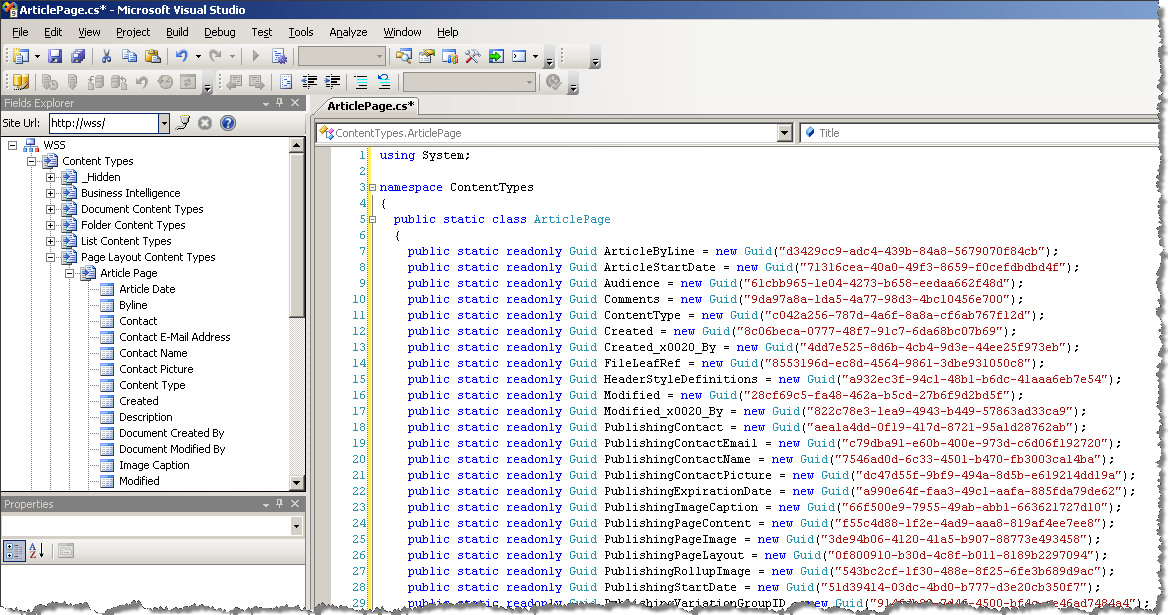
One of the coolest things of having the Imtech Fields Explorer inside Visual Studio is that when you let it export Site Columns/Content Types to XML or to generate code for you, the file is open inside Visual Studio where you can directly add it to your Solution:
No thing is without a downside. We’ve moved Imtech Fields Explorer to Visual Studio but we’re still using the SharePoint Object Model for communicating with SharePoint. If you’re developing remotely this version of the add-on will be of no use to you, unfortunately. Since we all develop locally here at Imtech ICT Velocity it wasn’t the highest priority to replace the SharePoint API with SharePoint Web Services. It doesn’t mean however that we won’t do it in the future. It’s all up to you and the feedback you will provide us.
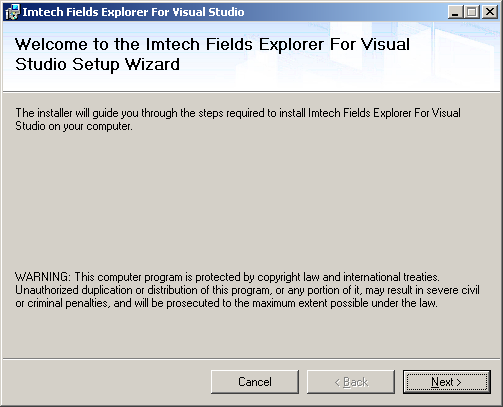
Imtech Fields Explorer for Visual Studio 2008 ships with an installer so there are no manual steps required in order to get it working. Simply fire up the MSI, click Next a couple of times and Fields Explorer should be available in your Visual Studio 2008.
I’ve been using Imtech Fields Explorer for Visual Studio 2008 for a couple of days myself and I have to admit that Jeffrey has done a lot of great work in the last few weeks. I really love the idea of having all the tools in one place and I’m quite sure that’s the course we will pick for the 2009.
Go on and check out Imtech Fields Explorer for Visual Studio 2008 (441KB, MSI)


January 8th, 2009 at 10:24 am
Newbiew question: have you considered this article :The Other Internal Column Names & Finding Field Types (http://www.heathersolomon.com/blog/articles/customitemstyle.aspx#ColNameFT)
January 8th, 2009 at 12:50 pm
@Xristos K: Sure, I've seen Heather's article before. Personally I prefer to have more overview of the Site Columns and Content Types rather than exploring the HTML. On the other hands it's okay if it works for you.
January 23rd, 2009 at 12:19 pm
I\'m trying to use this within the WSS SP1 VPC download (http://www.microsoft.com/downloads/details.aspx?familyid=1beeac6f-2ea1-4769-9948-74a74bd604fa&displaylang=en) and it is causing VS to crash. Any ideas?
I\'m not sure if its the same issue but the non VS version also fails to open.
The event log shows this:
EventType clr20r3, P1 devenv.exe, P2 9.0.21022.8, P3 47317b3d, P4 fieldsexplorervsaddin, P5 1.0.0.0, P6 494ba498, P7 a4, P8 13, P9 system.typeinitialization, P10 NIL.
January 26th, 2009 at 6:39 pm
@James: Do you know which version of Visual Studio is in the VPC? Do you have any more details on the failure of the non-VS version?
January 26th, 2009 at 6:51 pm
VS 2008 Professional RTM (plus VSEWSS1.2 and several Hotfixes). I can see the Fields Explorer and navigate Content Types etc. but when I export to XML it crashes.
The non-VS version doesn't cause any errors in the event log. I see the process start up in Task Manager but it disappears again straight away. Any ideas how I could get more info for you?
January 26th, 2009 at 6:55 pm
To provide the export to XML functionality I have used the AC's WCM Custom Commands for STSADM.EXE code (available @ http://andrewconnell.com/blog/articles/MossStsadmWcmCommands.aspx). Could you check whether the original code works on your environment?
January 26th, 2009 at 6:58 pm
I will have to check this tomorrow now. I'll get back to you.
January 27th, 2009 at 1:30 pm
I've installed the STSADM extensions and the ContentType export worked.
January 27th, 2009 at 5:30 pm
@James: thanks for checking. The only thing I could do is to compare my code with AC's. Unfortunately cannot give any promise on when I'll be able to do that.
January 27th, 2009 at 6:10 pm
No worries. I'm only playing around on that server, I will try the software on a self-built server in the next few days so I'll let you know if the problem persists.
January 27th, 2009 at 6:15 pm
@James: great, looking forward to your feedback
February 3rd, 2009 at 10:33 am
Hi Waldek, have you tested this in VS 2008 (Team System, SP1, .NET 3.5 SP1) but on Windows Server 2008 x64?
I can see the Fields Explorer window, but when I try to enter the site URL, I get an error indicating that the web application at [url] could not be found. I also tried localhost variants, with/without trailing "/", FQDN, you name it.
I have confirmed that the same URL works in IE, so I know SP is running. I *am* using different ports (I have nothing on port 80); could this be it?
Right now, I am guessing it's either x64 OS, the port, or something else. Thoughts?
(Thank you for this great tool. I am anxious to see how much it will speed up my dev.)
February 3rd, 2009 at 10:45 am
@Sherman Woo: thank you for your comment. Haven't checked it yet but will try to give it a look as soon as possible. Will let you know if I find something.
February 5th, 2009 at 8:28 am
@Sherman Woo: Jeffrey has just had a look at the Fields Explorer Visual Studio 2008 add-in on Windows 2008 (x86 though). It works correctly. Are you trying to open a remote site by any chance?
February 5th, 2009 at 10:06 am
Hi Waldek, no, everything is local. I just tried installing your tool in my Server 2003 x86 VM, and it works fine. (I know, I changed 2 variables, but I don't have a Server 2008 x86 VM at home.)
It's worth noting in my Server 2008 x64 VM, I had installed John Holliday's CAML Intellisense tool and Andrew Connell's VS "Root folder" add-in ahead of yours, in case that might have an effect.
HTH.
February 5th, 2009 at 1:47 pm
@Sherman Woo: Thanks for the details. Unfortunately I don't know if Imtech Fields Explorer has any conflicts with any of the tools you've mentioned. We will check it out and let you know if we find anything.
February 16th, 2009 at 9:46 pm
Thanks for the great tool, already saved me a couple of hours on my dev projects.
We made it "Pick of the month" on http://www.sharepoint-tools.de
Oliver
February 18th, 2009 at 8:23 am
@Oliver: Thanks for making the tool "Pick of the month" It's nice to see that something you make, is usefull for others. Hopefully future tools from me/us will be just as usefull to you
March 12th, 2009 at 3:46 am
I also encountered the same issue on a 64 bit W2K3 OS.
July 20th, 2009 at 2:52 pm
Excellent work! Thanks!