Optimize Publishing Pages for search engines using the Imtech SharePoint SEO Slugs Feature
SEO, SharePoint, Tools, WCMRecently I have made a Live Writer plugin which helps you create search engines optimized names for your blog posts (slugs). While I was working on a new MOSS 2007 Web Content Management (WCM) solution I have noticed that the standard page names generated by SharePoint while creating Publishing Pages can be optimized for better findability.
How MOSS 2007 deals with slugs
While creating a new Publishing Page the first thing you do is to enter the title. Based on your input SharePoint automatically fills in for you the name (slug) of the Publishing Page you are about to create.
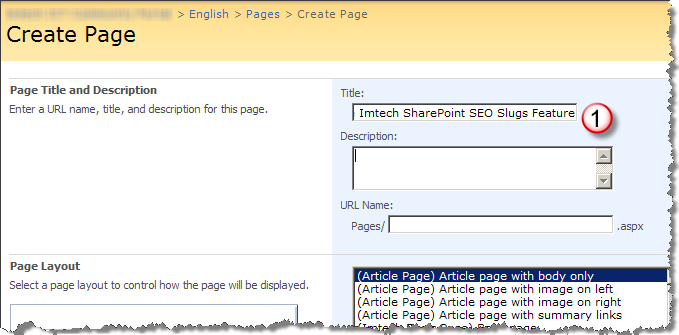
While generating the name SharePoint removes special characters from the title and makes one huge word of it:
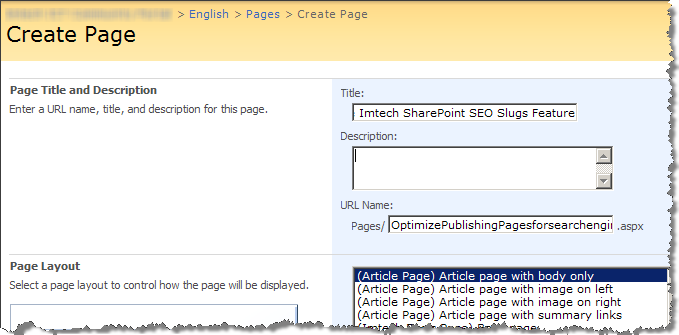
Such slug is difficult to index by the search engines as they cannot easily distinct the various words making up the page name. As a result your page will end up relatively lower in the search results than a page with similar content and an optimized slug.
The page name generated by SharePoint is just a suggestion and while you can overwrite it each time you create a new Publishing Page why would you not make it happen automatically?
Introducing Imtech SharePoint SEO Slugs
Imtech SharePoint SEO Slugs is a SharePoint Feature which hooks up to the Create Page Application Page provided with MOSS 2007. While creating a slug it not only separates all the different words with a hyphen (-) but also removes all the stop words as well! Looking at the example I used before: instead of the standard: OptimizePublishingPagesforsearchenginesusingtheImtechSharePointSEOSlugsFeature (which is by the way almost impossible to type) you will get a nice: optimize-publishing-pages-search-engines-imtech-sharepoint-seo-slugs-feature. Notice that such URL is easier to read and memorize.
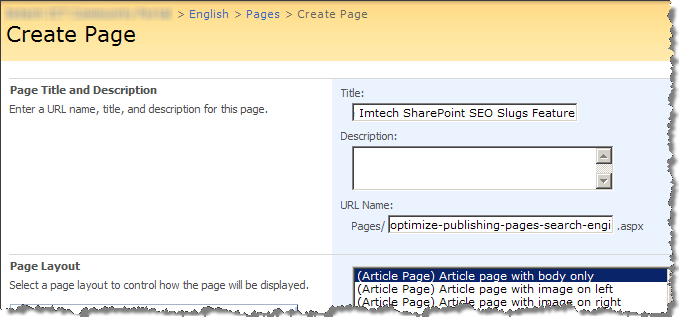
Imtech SharePoint SEO Slugs is a Feature which can be used with MOSS 2007 WCM only. Upon deployment a new WebApplication-scoped Feature will be installed. By activating the Imtech SharePoint SEO Slugs Feature the new mechanism will get installed.
Important
In some scenarios it might be required to restart IIS and clear the ASP.NET Temporary Files (located in C:\WINDOWS\Microsoft.NET\Framework\v2.0.50727\Temporary ASP.NET Files) upon the Feature Activation in order to enable the Feature.
Download: Imtech SharePoint SEO Slugs v1.0.0.0 (11KB)


September 2nd, 2008 at 3:51 pm
good features.man!
September 5th, 2008 at 8:44 am
Very good feature! Can you post some details how you were able to modify the create page?
cheers
September 6th, 2008 at 9:35 am
Generating the page name is JavaScript based. So using an ASP.NET Page Adapter I have added some additional JavaScript code to the page which makes generating SEO Slugs happen.
October 15th, 2008 at 11:51 pm
Great post. Thank you
July 24th, 2009 at 1:38 pm
I would like to say thank you for providing this niffy solution.
We have installed the feature. But our page url does not get separated with "-". We are working on a 64bit MOSS platform…..does this matter?
July 24th, 2009 at 2:58 pm
@Sam: Have you cleared the ASP.NET temporary files? It might just be that the cached pages are preventing the solution from kicking in.
October 11th, 2009 at 11:48 pm
This is a nice little feature, however, I just copy the title as I wrote it and insert it into the file name with the spaces, and that works fine.
I would like to see a way to optimize the search results page titles.
MOSS always titles the search results like so: Search Results: LinkedIn. What the search engines apparently see is "Search Results".
If a search were performed for "LinkedIn", it would be much more relevant if the title of the search results page were simply "LinkedIn".
Likewise for a search performed with two or more words like "Wisconsin Insurance Company", then the title would be more helpful to people and search engines if the search results page was dynamically titled "Wisconsin Insurance Company".
Let me know if you come up with something, and I'll even compensate you for your time.
Thanks, Brian Bateman, http://www.usalocalsearch.com
October 12th, 2009 at 7:07 am
@Brian: Just let me check if I understand you correctly: you want the title of the Search Results page to be "My Query" instead "Search Results: My Query"? A while ago I've worked on a WCM site that uses SharePoint Search. Changing the title of the page was as easy as changing it in the Master Page. Check out http://www.oasen.nl/Pages/Results.aspx?k=test for results. Is that what you want to achieve?
March 8th, 2010 at 12:42 pm
Excellent work Waldek. Works a treat with the key being your last disclaimer on performing an IISReset and flushing out the temporary ASP.NET files. Didn't work for me initially until I did this.
March 8th, 2010 at 4:43 pm
@Mark: Thanks! Great to hear it helped you!
May 3rd, 2010 at 8:53 pm
Great solution Waldek!:D Thanks for sharing!!