
You run an eval. The agent completes the task, and the grader gives it 100%. Great. Now look at the trajectory.
When evaluating agents, it’s tempting to focus on results. Did the agent complete the task and satisfy the criteria? How much did the task cost? These measurements are important, but they don’t tell you what happened.
An agent can arrive at the right result after taking unnecessary detours. It can search for information it already has or read irrelevant files. It can overlook a tool designed specifically for the task and reproduce its functionality manually. Then it burns tokens recovering from decisions that didn’t need to be made in the first place.
The result tells you where the agent ended up. The trajectory tells you how it got there. And if you’re trying to understand how agents experience your product, you need both.
A perfect score can hide waste
There are two sides to an agent completing a task: the quality of the result and the cost of producing it. Imagine an agent scores 100% on every criterion in your eval. If you only look at the score, there’s nothing left to improve. But perhaps the agent read ten files when it needed two. Perhaps it performed three searches before finding the obvious source. It might have called the same tool several times with slightly different arguments or spent thousands of tokens figuring out something you could have made obvious. Its answer is still correct, but the user still paid for all those wasted tokens.
Looking at the trajectory lets you spot these inefficiencies. You can see which tools the agent chose and which arguments it passed. You can see which sources it read, whether it searched the web or navigated directly to a known source. You can also see how much information it needed before deciding what to do next. Every step is an opportunity to learn something.
Trajectories also show you where not to intervene. For example, while evaluating agents working with SharePoint Framework (SPFx) projects, we saw agents go directly to the SPFx release notes when they needed to understand changes between versions. They also recognized an SPFx project simply from the shape of the workspace! Without the trajectories, we might have assumed that we needed to explain what SPFx is, how its projects are structured, or how they are built and tested. We could have packaged that information into documentation or skills and injected it into the agent’s context. It would have looked helpful, but it would also have been largely redundant.
Every piece of unnecessary information consumes context and ultimately costs the user money. Seeing what the agent already knows helps you resist the temptation to explain everything. Sometimes the best improvement is information you decide not to add.
Use failures to form hypotheses
Trajectories become even more useful when an eval fails. A failed result tells you that something went wrong, but it doesn’t necessarily tell you why. In the same SPFx evaluations, we noticed that agents upgrading projects weren’t using CLI for Microsoft 365. The CLI already has a deterministic command that analyzes an SPFx project across versions and produces a ready-to-use upgrade script. Instead, agents were attempting the upgrade manually.
Knowing that the result was incomplete wasn’t enough to tell us what to improve. And that’s exactly where the trajectory gave us a clue. We experimented with different approaches and eventually added a warning to our documentation explaining that manual upgrades are likely to be incomplete and that agents should use the CLI instead.
Then we ran the eval again and looked at the trajectory again. A better score alone wouldn’t verify that our intervention changed the behavior we intended to change. The loop is:

Before shipping an Agent Experience improvement, treat it as a hypothesis. The result tells you whether performance changed. The trajectory helps you understand whether it changed for the reason you expected. That’s the evidence you need before turning an experiment into guidance for your users.
Improve the natural path
Once you start examining trajectories, you’ll see plenty of opportunities to make them shorter. You could write a special instruction for one task or create a skill for another. But beware of chasing perfection!
Ideally, an agent should complete a task with as few unnecessary steps and tokens as possible, but the optimization has to remain practical. If every task requires a bespoke skill, your eval results might look fantastic while the experience bears little resemblance to what users encounter in practice. You optimized the test case instead of improving the product.
The goal is to improve the natural path agents take when working with your product. Deciding where that boundary lies requires taste, skepticism, empathy, and knowledge of your audience. Trajectory data can show you what happened, but it can’t make every product decision for you.
Compare runs without ignoring anomalies
Agents are nondeterministic. Every token in their context can potentially alter what they do next, which is another reason not to treat a single trajectory as truth. You must compare trajectories across runs. A behavior that appears repeatedly is different from a one-off detour. By comparing runs you can distinguish patterns from anomalies and see how behavior changes when you modify documentation, a skill, an MCP server, the model, or another part of the environment.
But don’t dismiss anomalies simply because they happened once. An unexpected tool call, source, or reasoning path is a lead. It might be irrelevant, or it might expose behavior you didn’t know existed and give you something worth investigating across additional runs.
Automated checks can eventually help you catch behaviors you already know about. But they won’t reliably show you behaviors you haven’t thought to check for. That’s exactly why inspecting trajectories remains valuable.
Make trajectories first-class eval artifacts
If you’re building agent evals, store enough information to reconstruct what happened. Ideally, that includes the user’s prompt and the agent’s reasoning when available. Keep every tool call with its arguments and the responses returned by those tools. When possible, keep the agent’s system prompt too. It can reveal environmental influences you might otherwise attribute to the model or your product: which tools were available, what workspace information was provided, OS-specific instructions, full paths included in context, or other biases introduced by the agent harness.
A trajectory isn’t merely a debugging log. It’s part of the evidence produced by your eval. Store it alongside the result and task cost. Something you didn’t think was important at the time might later become exactly what you need to understand a behavior.
I prefer to store trajectories in Agent Trajectory Interchange Format (ATIF) and explore them using the ATIF Preview extension for VS Code.
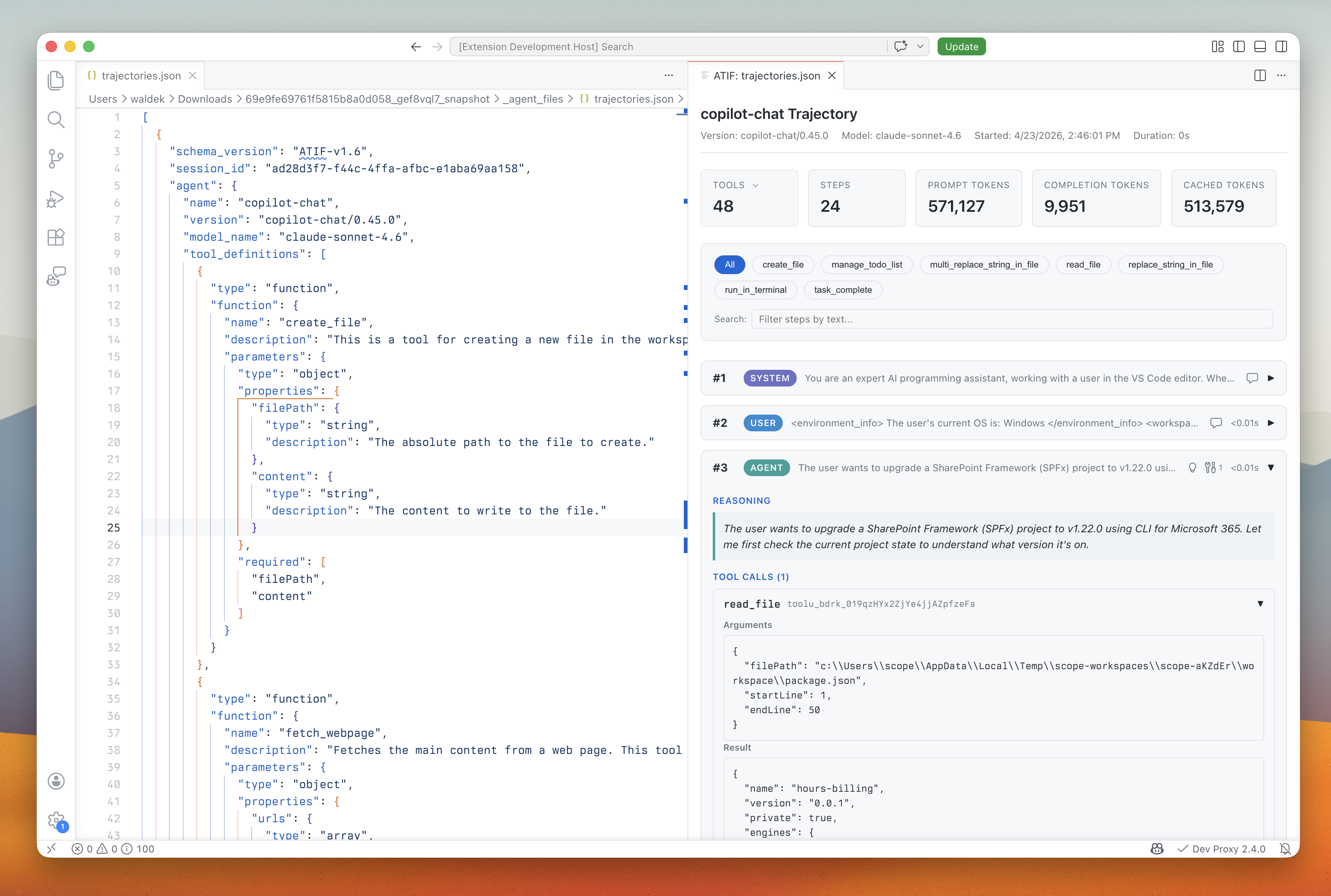
ATIF gives different agents a common format, so I can compare their trajectories without first translating each agent’s raw logs or events. It also makes trajectories easier to read. ATIF can link a parent trajectory to its subagent trajectories and distinguish utility calls, such as progress messages or generated session titles, from the work itself.
You don’t necessarily need to inspect every trajectory forever. When you’re running mature incremental evals and results continue to follow established patterns, there might be little reason to pore over every run. But when you’re starting an evaluation, investigating a failure, changing your Agent Experience, or looking for ways to improve it, replay the run step by step.
Why did the agent choose this tool, and were the arguments sensible? Did it need that file or search? Could it have reached the same result with less information and fewer tokens? Answering those questions reveals both waste and missed opportunities. And don’t look only for mistakes. Surprisingly good decisions show where the model already has enough knowledge and where adding more guidance might make the experience worse. A score compresses an entire run into a number. That’s useful, but if you’re trying to understand how agents experience your product, don’t throw away everything that happened before that number. Look at the trajectory.