
When you update an agent skill, your eval results tell you whether the update was worth it. You compare success rate and task cost before and after, then keep your work or revert it. But what if the evidence is incomplete? What if the agent does something valuable that your rubric doesn’t recognize? In that case, the scores push you to throw away an improvement without any hint that the rubric is what’s wrong.
I ran into exactly this while evaluating a skill for upgrading SharePoint Framework (SPFx) projects. After we updated the skill, our evals showed a much higher cost per run and no improvement in success rate. But the agent trajectories revealed valuable work that our rubric had missed, along with some work the skill shouldn’t have asked for.
Nearly twice the cost, same success rate
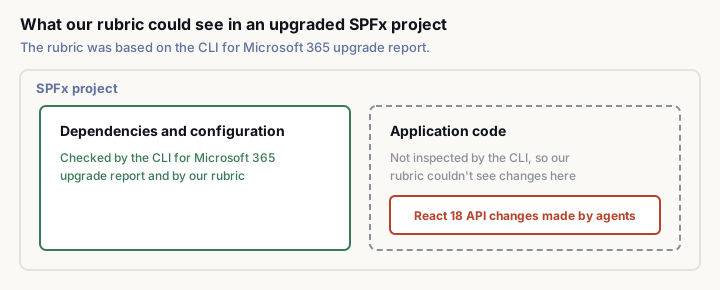
We were evaluating upgrades from SPFx 1.23.2 to 1.24.1. One of the changes in the new version is support for React 18, which introduced a newer way of rendering components. The APIs used with React 17 still work, but they’re deprecated. Calls to them sit in the project’s application code, which is exactly the part our rubric didn’t look at. We based the rubric on the upgrade report from CLI for Microsoft 365. The CLI checks an SPFx project for changes that an upgrade requires, from dependencies to configuration. By design, it doesn’t inspect application code, because SPFx maintains backward compatibility and developers structure their applications in very different ways.
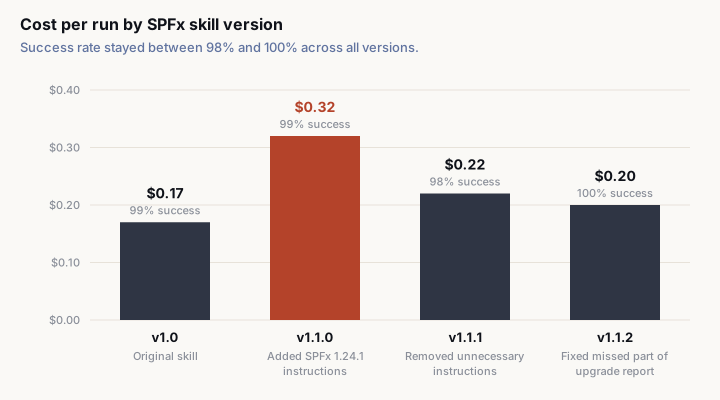
To support SPFx 1.24.1, we added several instructions to our SPFx development skill, including one to move application code to the React 18 APIs. Then we ran our evals again. The success rate didn’t change, but the cost per run nearly doubled, from $0.17 to $0.32. At face value, we were paying more for the same result. Had we stopped at the scores, we could easily have concluded that the update wasn’t worth keeping and reverted it.
What the scores didn’t tell us
We inspected the agent trajectories to find out where the extra cost came from. Part of it came from the React instruction. Agents consistently moved application code to the React 18 APIs, but our rubric didn’t recognize any of that work because it only checked what the CLI for Microsoft 365 upgrade report covers. Was updating the code necessary? Strictly speaking, no. The older React APIs still work, but developers generally don’t want to finish an upgrade with deprecated APIs and new warnings in their project. In some CI environments, warnings can even block production builds.
When someone asks to upgrade their project to a newer version, they reasonably expect the project to be up to date with that version. What “up to date” means can change from one release to the next, even when the user’s instruction stays exactly the same. For SPFx 1.24.1, it means moving off the deprecated React APIs. So the agents’ extra work was valuable, even though our rubric didn’t account for it. We’re now updating the rubric to check for the React API changes and to verify that upgraded projects build without new warnings. Once the new rubric is in place, we’ll quantify the improvement we’ve so far only seen in the trajectories and establish a new baseline for the skill.
Other new instructions in v1.1.0 added cost too. The trajectories showed agents following them to make changes that were technically meaningful but went beyond what the upgrade needed. In v1.1.1, we removed those instructions while keeping the React one. That brought the cost down to $0.22 per run, with a 98% success rate. The final version, v1.1.2, fixed an issue where the agent missed part of the upgrade report. It reached a 100% success rate at $0.20 per run, only $0.03 more than the original skill. In every one of those runs, the agent still moved the application code to the React 18 APIs. Looking at the trajectories let us separate the work that only added cost from the work that delivered value we weren’t measuring.
Your rubric is an opinion
An eval rubric is your interpretation of what successful task completion looks like. You need it to evaluate agents consistently, but that doesn’t make it complete or permanently correct. There was nothing careless about our rubric. It came from an established upgrade tool with a deliberate scope. Our mistake was treating that scope as enough to judge everything the agent should do. Had we trusted the results without investigating, we might have removed a useful improvement. Had we assumed that everything the agent did was valuable, we would have kept unnecessary work and paid for it on every run. Neither would have been the right decision.
That’s why I think of rubrics as strong opinions, loosely held. Define success as clearly as you can, but stay skeptical of your assumptions. When the evidence suggests that your rubric is missing something, be willing to change it. But don’t expand the rubric every time an agent does something you didn’t anticipate. An agent might do extra work because it’s necessary, because it’s helpful, or simply because it can. Depending on which it is, you either add that work to your rubric or remove the instruction that caused it. A change can be technically correct and still not belong in the task, which is exactly what we found with the extra changes we cut in v1.1.1.
Telling those reasons apart takes human judgment, so don’t hand it to an agent that automatically revises your rubric based on its trajectories. You’d risk turning the evaluation into a mechanism that rewards whatever the agent happens to do. Instead of measuring whether the agent meets your expectations, you’d end up adjusting your expectations to match the agent. Use what you know about your domain and your customers to weigh the evidence in the trajectories. Then decide whether you’ve found a genuine gap in your rubric or behavior you should push back on.
Let the results guide your investigation
You need both success rate and task cost to evaluate an agent, because either one alone gives you an incomplete picture. An unchanged success rate with a much higher cost can mean wasted work. Or, as we found, it can mean valuable work that your rubric doesn’t measure. A higher success rate might look promising, but you still need to know what that improvement cost. And even when both numbers stay the same, the agent isn’t necessarily behaving the way it did before. You don’t need to inspect every trajectory with the same intensity, though. Here’s the approach I use when reviewing eval results:
- Compare success rate and task cost together, against your baseline and your expectations.
- Investigate outliers and unexpected changes first. When cost or success rate moves without an obvious explanation, inspect the trajectories to find out why.
- Spot-check ordinary results. Even when everything looks fine, review a sample of trajectories to confirm that the agent still behaves as intended.
- Challenge your assumptions. When you find unexpected behavior, ask whether the agent is doing unnecessary work or your rubric is missing something valuable.
- Make deliberate changes and evaluate again. Adjust the skill, the rubric, or both, then establish a new baseline that reflects your updated understanding of success.
Whatever order you follow, resist the temptation to jump from a score straight to a decision without understanding what produced it. The cost jump in our SPFx evals deserved attention. But looking closer led us to trim the skill and question an assumption behind our rubric instead of reverting the update. Your rubrics won’t anticipate everything. Agent behavior evolves. So does what users reasonably expect from a task, even when they phrase it the same way. Keep measuring success and cost. Keep inspecting trajectories. And when the evidence challenges your expectations, be prepared to question not only your agent, but also the way you’ve defined success.